











Picking AI agents for business is harder than it looks. Every vendor claims their agent "automates work," but a support bot, a sales assistant, and a custom workflow agent solve very different problems. Pricing ranges from $20 per seat to six-figure builds, and the wrong pick wastes a quarter of your budget.
Here is the short answer. Small teams under 50 people should start with off-the-shelf platforms that cost under $500 a month. Mid-sized and enterprise companies usually outgrow those tools once agents need access to internal data, approvals, and compliance controls. At that point, a platform with real integration depth or a custom build pays off.
This list ranks 12 options, from no-code tools to enterprise platforms. For each one, you get what it does, what it costs, and which company size and use case it fits. Our team at Hatzs Dimensions has shipped production AI agents for 250+ clients, so the notes on limits and hidden costs come from real deployments, not vendor demos.
1. Hatzs Dimensions custom AI agents
What it does
Hatzs Dimensions builds custom AI agents around your systems, data, and rules instead of asking you to fit a template. We handle design, engineering, and ongoing support, so you get a production agent, not a prototype. Typical builds include:
- Support and claims agents that resolve tickets or process documents
- Sales agents that qualify leads and book meetings
- Operations agents that reconcile data, route approvals, and update records
Best for company size and use case
Mid-sized and enterprise teams in insurance, banking, healthcare, and logistics get the most from this route. These AI agents for businesses with complex workflows need to read and write to core systems, apply compliance rules, and leave an audit trail. Our insurance work cut operations costs by 30% because the agent sat inside the claims process, not beside it.
Buy a platform for generic tasks, and build custom when the agent must act on your own data.
Skip this option if you only need an inbox helper or a simple lead-capture bot. The no-code tools later in this list do that for far less money.
Cost and pricing model
We do not publish a price list, because scope drives cost. Pricing is quoted after discovery, and you choose between two engagement models:
| Model | Best when | How you pay |
|---|---|---|
| Fixed-price project | Scope is clear and budget must be certain | One agreed price per deliverable |
| Dedicated team | The roadmap will change or you plan several agents | Ongoing monthly team cost |
Expect a higher upfront spend than a subscription, but no per-seat or per-conversation platform fees. Budget separately for model usage and cloud hosting.
Setup effort and integrations
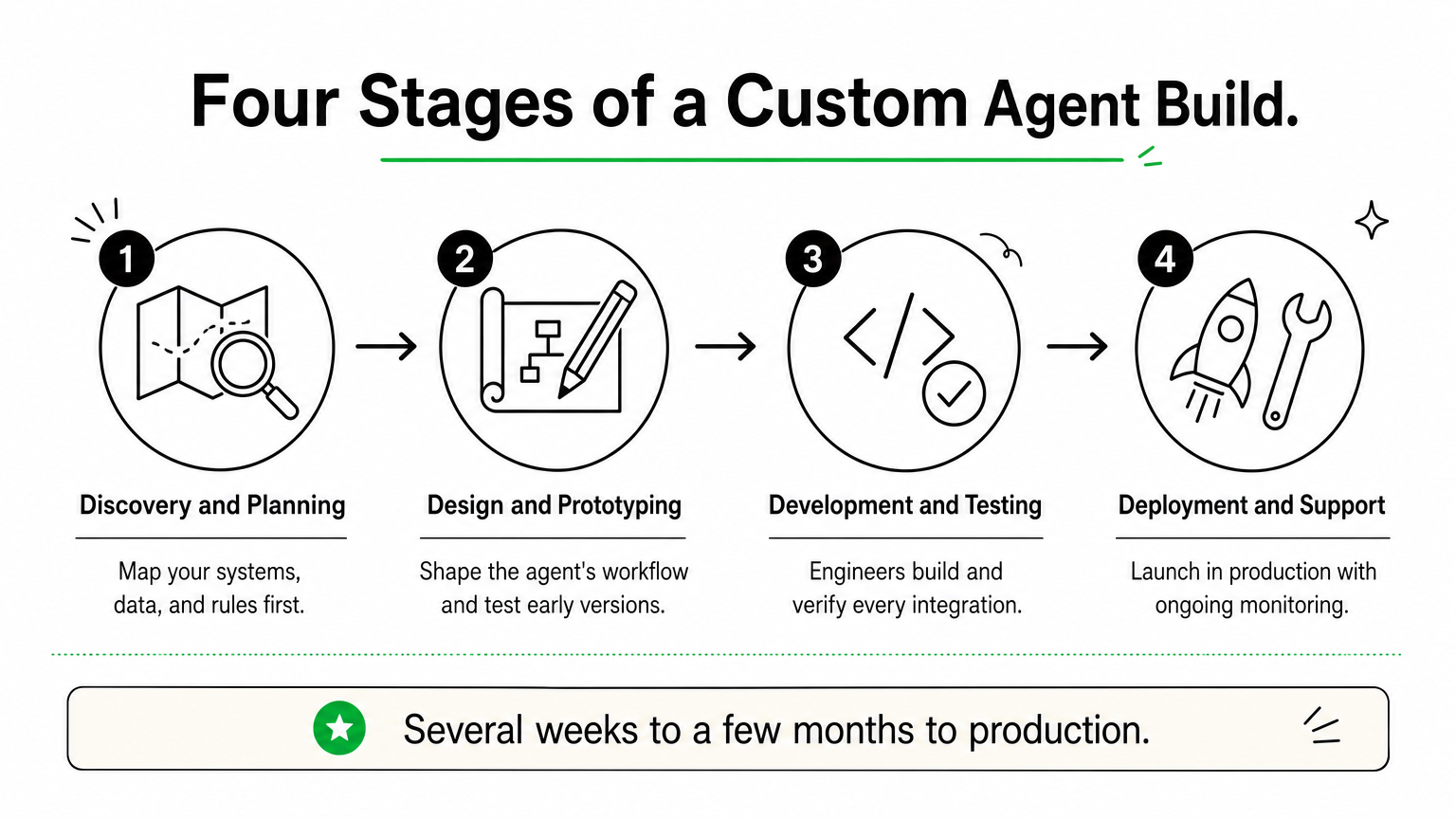
Every project runs through four stages, with senior engineers on each one:
- Discovery and planning
- Design and prototyping
- Development and testing
- Deployment and support
A focused first agent usually reaches production in several weeks to a few months, depending on data quality and how many systems it touches. We connect to CRMs, ERPs, databases, and cloud services through APIs, and we can add data governance and AI governance controls from day one.
Limitations to know
Custom means slower to start than a subscription. You cannot sign up on Friday and run an agent on Monday, and the upfront investment is real.
You also need an internal owner who can answer process questions and approve decisions. Without one, projects stall. And because you own the system, plan for monitoring and updates after launch, whether you handle them or we do under a support agreement.
2. Microsoft Copilot Studio
What it does
Copilot Studio is Microsoft’s low-code builder for AI agents. You describe a task in plain language, connect knowledge sources such as SharePoint, and publish to Teams, a website, or Microsoft 365 Copilot.
Agents can also run on their own. Autonomous agents trigger on events like a new email or a changed record, then act without a prompt.
Best for company size and use case
Mid-sized and enterprise teams already on Microsoft 365 get the fastest return. IT helpdesk, HR questions, and internal knowledge bots fit well, because the data and identity controls already exist.
Copilot Studio wins when your data already lives in Microsoft 365.
Shops outside the Microsoft ecosystem lose most of that advantage. Small teams without Microsoft licensing should look at Zapier Agents or Lindy instead.
Cost and pricing model
Pricing is usage-based, built on Copilot Credits. Confirm current numbers on Microsoft’s Copilot Studio page before budgeting, because plans change often.
| Option | Price | Notes |
|---|---|---|
| Credit pack | $200 per month | 25,000 credits, shared across the tenant |
| Pay-as-you-go | $0.01 per credit | No upfront commitment |
| Microsoft 365 Copilot | $30 per user per month | Covers agent use inside Microsoft 365 |
Setup effort and integrations
Simple agents take hours to days. Anything touching approvals or several systems needs someone who knows Power Platform.
- Over 1,000 connectors, including Dynamics 365, SAP, and ServiceNow
- Governance through Entra ID, Purview, and the admin center
- Custom actions through Power Automate flows or APIs
Limitations to know
Credit consumption is hard to predict. Generative answers and agent actions burn credits fast, so monthly costs can climb as adoption grows.
Deep customization hits a ceiling. Agents that need complex multi-system logic or data outside Microsoft’s stack often end up needing custom engineering.
3. Salesforce Agentforce
What it does

Agentforce is Salesforce’s platform for building AI agents that work inside your CRM. Agents answer customers, qualify leads, and update records using data from Sales Cloud, Service Cloud, and Data Cloud. You set topics, guardrails, and actions in Agent Builder, then deploy to chat, email, web, or Slack.
Best for company size and use case
Mid-sized and enterprise companies already running Salesforce get the most value. Service case deflection, lead qualification, and sales follow-up fit best, because the agent reads the same records your reps use.
Agentforce pays off when Salesforce is already your system of record.
Teams on another CRM would pay for a migration before they got an agent. Small businesses will find the licensing heavy for what they need.
Cost and pricing model
Salesforce has changed its pricing several times, so verify numbers on the Agentforce pricing page before you budget. Three models are common:
| Model | Price | Notes |
|---|---|---|
| Flex Credits | $0.10 per action | Sold in packs, such as $500 for 100,000 credits |
| Per-user add-ons | From $125 per user per month | Built for employee-facing agents |
| Agentforce 1 Editions | From $550 per user per month | Bundled licenses across clouds |
Setup effort and integrations
A basic service agent can go live in a few weeks if your Salesforce data is clean. Plan on a Salesforce admin or implementation partner. Agents connect through Flow, Apex, and MuleSoft, and the Einstein Trust Layer masks sensitive data before it reaches the model.
Limitations to know
Action-based billing is hard to forecast, since every lookup and update can consume credits. Data Cloud often becomes a required add-on, which raises the total bill.
Agent quality also depends on your CRM data. Messy records produce weak answers, and systems outside Salesforce need extra integration work.
4. Sierra
What it does
Sierra builds conversational agents for customer service. They handle chat, email, and voice, and they take real actions, such as processing a return, changing a subscription, or rebooking a delivery. Bret Taylor, a former Salesforce co-CEO, co-founded the company, and teams configure agent behavior through Sierra’s Agent SDK and tooling. Brand voice, escalation rules, and guardrails are set up front.
Best for company size and use case
Among AI agents for business, Sierra is one of the most narrowly focused. It suits large consumer brands in retail, telecom, subscription services, and financial services, where support volume is the biggest cost line. Internal helpdesks and back-office automation are not its strength.
Sierra fits companies whose biggest expense is customer conversations.
Cost and pricing model
Sierra does not publish prices. You get a quote through sales. The company is known for outcome-based pricing, where you pay when the agent resolves a conversation without a human handoff. Ask early how a "resolution" is defined, because that definition drives your invoice.
Setup effort and integrations
Onboarding is sales-led and hands-on. Expect weeks, not hours, and plan for engineering time to expose the right actions safely. Typical connections include:
- Your CRM and helpdesk
- Order, billing, and subscription systems
- Knowledge bases and policy documents
- Telephony for voice agents
Limitations to know
There is no self-serve trial, so you cannot test it over a weekend. Budgets skew toward enterprise, which puts it out of reach for most small teams.
It also stays in the customer-facing lane. If you need agents that reconcile data or route internal approvals, look at Copilot Studio or a custom build instead.
5. Google Gemini Enterprise Agent Platform
What it does
Google’s offering pairs Gemini Enterprise, a workspace where employees build and run agents, with Vertex AI Agent Builder for developers. Google renames and bundles these products often, so check current names on the Gemini Enterprise page.
- No-code agent designer for business users
- Agent Development Kit for custom code
- Managed runtime and Agent2Agent protocol support
Best for company size and use case
Mid-sized and enterprise teams on Google Cloud or Workspace get the most from it. For AI agents for business that search across Drive, Gmail, and BigQuery, the data connections already exist. Research, document analysis, and data-heavy workflows fit best.
Choose Google’s platform when your data already lives in Google Cloud.
Cost and pricing model
Pricing mixes per-user seats with usage-based charges for developer tools. Verify figures before budgeting, because they shift.
| Component | Typical price | Notes |
|---|---|---|
| Gemini Business | About $21 per user per month | Smaller teams |
| Gemini Enterprise | From about $30 per user per month | Adds governance and security |
| Agent Builder and runtime | Usage-based | Billed on compute and model tokens |
Setup effort and integrations
Business users can launch a simple agent in hours. Custom agents built with the Agent Development Kit need cloud engineers who understand IAM, networking, and deployment.
- Connectors for Google Workspace, Salesforce, SAP, and Microsoft 365
- Access controls through Google Cloud IAM
- Model choice beyond Gemini through Vertex AI
Limitations to know
The product line is broad and confusing. Teams often struggle to tell which tier they need, and usage costs on the developer side are hard to forecast.
Companies outside Google’s ecosystem also lose the main advantage. Without Workspace or Google Cloud data, integration work grows and the case for this platform weakens.
6. Lindy
What it does
Lindy is a no-code builder for AI agents. You describe a job in plain language, pick a trigger such as a new email or calendar event, and the agent follows the steps you set. Popular templates include:
- Inbox triage and drafted replies
- Meeting scheduling and call notes
- Lead research and outreach
Best for company size and use case
Small teams and solo operators get the most from it. For AI agents for business with 1 to 50 people, Lindy takes over repetitive admin work like follow-ups, scheduling, and CRM updates, with no developer involved.
Lindy works best as a fast, low-cost assistant, not as core infrastructure.
Larger companies can use it for sales or ops pilots, but they will hit limits quickly.
Cost and pricing model
Lindy bills by credits, and plans change often. Check the current numbers before you commit.
| Plan | Approx. price | Notes |
|---|---|---|
| Free | $0 | Small credit allowance for testing |
| Pro | About $50 per month | Several thousand credits |
| Business | About $300 per month | Higher limits, team features |
| Enterprise | Custom | Security and support add-ons |
Long, multi-step tasks use more credits, so heavy usage costs more than the sticker price suggests.
Setup effort and integrations
Most agents take under an hour to build and test. You connect Gmail, Google Calendar, Slack, HubSpot, Salesforce, and Notion with a few clicks, and thousands of other apps are reachable through partner connections.
Limitations to know
Complex jobs with many branches can misfire without close testing, so review outputs before you let an agent send anything to customers. Governance is also thin. You get little control over audit trails, data residency, or role-based approvals.
Once an agent must write to your core systems under compliance rules, a custom build is the safer route.
7. Zapier Agents
What it does
Zapier Agents lets you build AI teammates that work across your apps. You write instructions, attach data sources, and the agent uses Zapier’s app connections to take action. It can also browse the web for research. Typical jobs include:
- Researching leads and enriching CRM records
- Drafting and routing support replies
- Summarizing meetings and posting follow-ups
Best for company size and use case
Small and mid-sized teams that already run Zaps get the fastest win. Among AI agents for business in this price range, it suits ops, marketing, and sales teams that want flexible task automation without hiring engineers.
Zapier Agents work best when your tools are scattered across many apps.
Large regulated companies will want tighter controls than it offers.
Cost and pricing model
Billing is activity-based, so every agent action counts against a monthly allowance. Zapier adjusts plans often, so confirm figures on its pricing page. Treat these as rough ranges:
| Plan | Approx. price | Notes |
|---|---|---|
| Free | $0 | Small activity allowance for testing |
| Paid tiers | From about $35 per month | Larger allowances, billed annually |
| Team and Enterprise | Custom | SSO, admin controls, support |
Setup effort and integrations
A simple agent takes under an hour. Zapier connects to thousands of apps, including Gmail, Slack, HubSpot, Salesforce, and Google Sheets, so you rarely write code. Your existing Zaps can also become agent tools.
Limitations to know
Activity counts add up quickly. An agent that researches, drafts, and updates records in one run can use several activities per task, so heavy volume costs more than the entry price suggests.
Agents also act less predictably than fixed Zaps. Test with approval steps before you let one email customers. Governance and audit depth are thin, so core-system work under compliance rules points toward a custom build.
8. Gumloop
What it does
Gumloop is a visual no-code platform for building AI workflows and agents. You drag nodes onto a canvas and chain them together. The flow pulls data, runs an AI model, and pushes results into your other tools. Its built-in assistant can also draft a flow from a plain-language request. Common uses include:
- Scraping and enriching lead lists
- Summarizing documents and emails at scale
- Routing data between sheets, CRM, and Slack
Best for company size and use case
Ops, marketing, and sales teams of 5 to 200 people get the most from it. Among AI agents for business at this tier, Gumloop suits data-heavy repetitive work like lead enrichment and content pipelines, where you want more control than a simple trigger-and-action tool gives you.
Gumloop fits teams that want to see and tune every step of an agent.
Enterprises can run pilots on it, but regulated workloads need stronger controls.
Cost and pricing model
Pricing is credit-based, and plans move often, so check Gumloop’s site before you commit. Treat these as rough figures:
| Plan | Approx. price | Notes |
|---|---|---|
| Free | $0 | About 2,000 credits for testing |
| Solo | About $37 per month | Roughly 10,000 credits, billed annually |
| Team | About $244 per month | Larger credit pool, shared workspace |
| Enterprise | Custom | Security and support add-ons |
Model-heavy steps burn credits quickly, so high volume costs more than the entry price suggests.
Setup effort and integrations
Your first flow takes an hour or two to build and test. Gumloop connects to Gmail, Slack, Google Sheets, Notion, Airtable, and HubSpot, and an API request node reaches most other systems.
Expect more setup time than with Lindy, since you design the logic yourself. Anyone comfortable with spreadsheet formulas can manage it, so no engineers are required for standard flows.
Limitations to know
Governance is lighter than enterprise platforms offer, with limited audit depth and approval controls. The tool also leans toward structured workflows more than open-ended autonomy.
Large flows become hard to maintain as they grow, and credit costs rise with volume. If an agent must write to core systems under compliance rules, a custom build is the safer route.
9. Relevance AI
What it does
Relevance AI is a no-code platform for building AI agents and teams of agents. You give an agent instructions, a knowledge base, and tools, then run it on a trigger or a schedule. Its multi-agent workforce feature lets one agent hand work to another. Common builds include:
- Sales research and outbound drafting
- Inbound lead qualification
- Support triage and document processing
Best for company size and use case
Growth-stage and mid-sized teams of 20 to 500 people get the most from it. For AI agents for business that need more than one trigger and one action, it suits sales and operations teams that want several agents working a process together.
Relevance AI fits teams that want agents to collaborate, not just automate single tasks.
Solo operators will find simpler tools like Lindy cheaper and quicker to start.
Cost and pricing model
Pricing combines a monthly plan with usage credits, and Relevance AI has changed its tiers several times. Treat these as rough figures and confirm on its pricing page.
| Plan | Approx. price | Notes |
|---|---|---|
| Free | $0 | Small allowance for testing |
| Pro | About $19 per month | Solo and early pilots |
| Team | About $234 per month | Shared workspace, higher limits |
| Business | About $599 per month | Larger volume, more controls |
| Enterprise | Custom | Security and support add-ons |
Agents that call premium models or run long chains use more credits, so real costs track usage, not the plan name.
Setup effort and integrations
A first agent takes one to a few hours to build and test. You connect Gmail, Slack, HubSpot, Salesforce, and Google Sheets with a few clicks. For anything else, a custom API or code tool fills the gap. Standard agents need no engineers, but multi-agent flows reward someone who thinks in process logic.
Limitations to know
Costs are hard to forecast until you watch a pilot run for a few weeks. Chained agents also fail in subtle ways, so test each handoff before customers see any output.
Governance is lighter than enterprise platforms offer. If an agent must write to core systems under compliance rules, a custom build is the safer route.
10. n8n
What it does
n8n is a workflow automation platform with a built-in AI Agent node. You build on a visual canvas, connect a language model, memory, and tools, and the agent picks its next step. Unlike most tools above, you can self-host it on your own servers.
Best for company size and use case
Technical teams of 10 to 500 people get the most from it. For AI agents for business where data must stay inside your environment, n8n suits engineers and ops teams that want control over hosting and logic without coding everything from scratch.
n8n fits teams that want no-code speed with the option to drop into code.
Non-technical teams will move faster with Lindy or Zapier Agents.
Cost and pricing model
Billing is per workflow execution, not per step, so long agent runs stay predictable. The self-hosted Community Edition is free, and you pay only for servers. Cloud prices below are approximate, so confirm them before budgeting.
| Plan | Approx. price | Notes |
|---|---|---|
| Community (self-hosted) | $0 | You handle hosting and upkeep |
| Starter | About €20 per month | Around 2,500 executions |
| Pro | About €50 per month | Around 10,000 executions |
| Business and Enterprise | From about €667 per month | SSO, environments, support |
Setup effort and integrations
A first agent takes a few hours. Self-hosting adds a day or two for Docker, backups, and security. Key connection points:
- 400+ built-in integrations, including Gmail, Slack, HubSpot, and Postgres
- HTTP request nodes for any API
- JavaScript and Python code nodes for custom logic
Limitations to know
Self-hosting makes you responsible for uptime, updates, and security. Without a DevOps owner, small problems turn into outages.
The license is "fair-code," not fully open source, so check the terms before reselling it inside a product. Agents also need careful testing, and enterprise governance features sit on the higher tiers.
11. CrewAI
What it does
CrewAI is an open-source Python framework for building teams of AI agents. You define roles, such as researcher and writer, give each one goals and tools, and the "crew" splits the work. A paid platform adds a visual studio, deployment, and monitoring on top of the framework.
Best for company size and use case
Engineering-led teams of any size get the most from it. For AI agents for business that run multi-step research, content, or analysis pipelines, CrewAI gives developers full control over agent logic without building an orchestration layer from scratch.
CrewAI suits teams that have developers and want to own how their agents work.
Non-technical teams will move faster with Lindy or Zapier Agents.
Cost and pricing model
The framework is free under an open-source license. You pay for model usage and your own hosting, while the managed platform charges by execution. Tiers shift, so confirm current figures on CrewAI’s site.
| Option | Approx. price | Notes |
|---|---|---|
| Open source | $0 | You host and maintain it |
| Professional | About $25 per month | Set execution allowance, overage per run |
| Enterprise | Custom | Security, support, private deployment |
Setup effort and integrations
Expect a day or two to get a working crew, and longer to reach production. You need Python skills. CrewAI connects to OpenAI, Anthropic, Google, and local models, and custom tools wrap any API or database you already use.
Limitations to know
Code-first means no quick wins for non-developers. Multi-agent runs can loop or burn tokens, so set step limits and log every action.
Self-hosting leaves monitoring, security, and uptime with you. For regulated workloads that need audit trails, a custom build with governance from day one is the safer route.
12. Beam AI
What it does
Beam AI builds autonomous agents that run back-office processes from start to finish. Typical jobs include invoice matching, order management, and ticket resolution. You start from prebuilt agent templates or design your own, and the agents improve from the corrections your team makes. Human-in-the-loop review lets a person approve low-confidence decisions before anything executes.
Best for company size and use case
Mid-sized and enterprise operations teams get the most from it. Among AI agents for business, Beam suits high-volume, document-heavy processes in finance, supply chain, and customer operations, where staff lose hours re-keying data between systems.
Beam AI fits companies that want to automate whole processes, not individual tasks.
Small teams with simple inbox or scheduling jobs will do better with Lindy or Zapier Agents.
Cost and pricing model
Beam does not publish full pricing, so expect a sales-led quote. Confirm current terms on its site before you budget. Cost usually depends on three things:
- Number of agents in production
- Volume of tasks or process runs
- Support and security requirements
Ask for a fixed-price pilot so you can measure real savings before committing to a larger rollout.
Setup effort and integrations
Plan on several weeks for a first process. Most of that time goes to mapping rules and exceptions, not building, and templates shorten the work. Beam connects to ERP, CRM, helpdesk, and email systems through connectors and APIs. Your IT team must grant scoped access, and an operations lead should own the process definition.
Limitations to know
Scope is narrower than general builders. Beam targets process automation, so it is a poor fit for personal assistants or quick experiments. There is also little public pricing and no cheap self-serve path, which means you cannot test it over a weekend.
Unusual internal systems can push you toward extra engineering. When an agent must follow your exact rules inside legacy software, a custom build is worth pricing next to it.
Choosing your first AI agent
Start with the job, not the tool. If your team has under 50 people and a simple task, a no-code option like Lindy, Zapier Agents, or Gumloop gets you a working agent this week for under $500 a month. If your data already lives in Microsoft, Salesforce, or Google, use the platform that holds it.
Custom work earns its cost when the agent must act on your core systems under compliance rules. Most AI agents for business reach that point sooner than expected, and they then need audit trails, governance, and integration depth that subscriptions rarely offer.
Pilot one narrow process, measure the savings, then expand. If you want a senior team to scope that first build, talk to Hatzs Dimensions about custom AI agent development.
هل تريدون تنمية أعمالكم؟
التصنيفات
صُمّم للجريئين
نساعد الشركات الطموحة على تحويل أفكارها إلى أنظمة ذكاء اصطناعي وبرمجيات ومؤسسات جاهزة للإنتاج. احصل على رؤى حول الذكاء الاصطناعي والأتمتة والتحول الرقمي تصلك مباشرة إلى بريدك الإلكتروني.
200+ حلاً تم تسليمها في 11+ قطاعاً، فلنبنِ معاً ما هو قادم.