











Every engineering team is testing open source ai coding agents right now, and most are drowning in options. GitHub’s ecosystem alone lists dozens of forks and clones, each claiming to write, debug, or refactor code faster than the last one. If you’re a CTO or engineering lead trying to pick a tool that won’t get abandoned in six months, that noise gets expensive fast.
This list cuts through the marketing and answers the real question: which open source agents actually hold up in production workflows. We ranked each tool on code quality, community activity, integration depth, and how well it handles real repositories rather than toy demos. You’ll see where each one fits, whether that’s solo development, enterprise codebases, or regulated environments that need auditable, self-hosted AI.
We built this guide from the same lens we use when advising clients on moving AI from hype to real business impact at Hatzs Dimensions: production readiness matters more than hype. Below you’ll find eight agents worth testing in 2026, what makes each one different, and practical notes on where they fall short so you can match the tool to your actual workflow instead of the demo video.
1. OpenHands for scaling agent workflows across teams
OpenHands (formerly OpenDevin) is the closest thing the open source world has to a full engineering department in a box. Instead of a single chat window that suggests code, it runs autonomous agents that can plan a task, write code, execute it in a sandboxed environment, and iterate on the results without you babysitting every step. That distinction matters if you’re evaluating open source ai coding agents for anything beyond quick snippets.
How it works
OpenHands spins up an isolated Docker container for each session, giving the agent a real shell, a real file system, and the ability to run tests, install dependencies, and browse the web for documentation. The agentic loop is the core idea: the agent breaks a ticket into subtasks, executes them, checks the output against expected behavior, and self-corrects before handing you a diff. You can run it through a CLI, a lightweight web UI, or wire it into CI so agents pick up issues automatically.
The teams getting the most value from OpenHands treat it like a junior engineer with unlimited patience, not a magic autocomplete.
Who it’s for
Engineering leads managing multiple repositories and backlog items are the natural fit here, especially teams already comfortable with containerized dev environments. It also suits organizations experimenting with multi-agent orchestration, where one agent reviews another’s output before a human ever sees the PR. Solo developers can use it too, but the setup overhead (Docker, API keys, sandbox configuration) is more than you need for a single-file script.
Standout features
What separates OpenHands from lighter-weight assistants is its benchmark performance and its willingness to let the agent fail safely inside a sandbox rather than touching your live environment directly.
- SWE-bench performance: OpenHands has posted some of the strongest open source results on SWE-bench, a benchmark that tests whether agents can resolve real GitHub issues end to end.
- Multi-agent delegation: You can configure specialized sub-agents for planning, coding, and browsing, each handling a different part of the task.
- Event stream architecture: Every action and observation is logged as an event, which gives you a full audit trail of what the agent did and why, useful for teams that need to explain AI-driven changes to compliance reviewers.
- Extensible tool integration: Agents can call custom tools, hit internal APIs, or query documentation, which makes it adaptable to enterprise stacks rather than locked into a fixed toolset.
Pricing and licensing
OpenHands is released under the MIT license, so you can self-host, modify, and redistribute it without licensing fees. The catch is that it isn’t a free lunch on the model side. You still pay for whatever LLM backend you connect, whether that’s an API from a commercial provider or a self-hosted open weight model running on your own GPUs. Budget for token costs accordingly, since autonomous multi-step agents burn through context far faster than a single chat completion. For teams weighing self-hosted infrastructure against managed AI deployment, this is exactly the kind of tradeoff we help clients model out at Hatzs Dimensions, before they commit engineering hours to a rollout.
2. OpenCode for terminal-first development
OpenCode strips away the browser tabs and IDE panels and puts the agent right where a lot of senior engineers already live: the terminal. It’s built for developers who find switching between a chat window and their editor slows them down more than it helps, and it treats the command line as a first-class interface rather than an afterthought bolted onto a GUI product.
How it works
Running OpenCode drops you into an interactive terminal UI (TUI) where you describe a task in plain language and watch the agent read files, propose diffs, and execute shell commands in real time. It supports multiple LLM providers through a simple config file, so you can point it at Anthropic, OpenAI, or a local model without touching source code. Sessions are scriptable too, which means you can pipe tasks in from other tools or trigger runs as part of a build pipeline.
If your team already lives in tmux and vim, OpenCode meets you there instead of asking you to change habits.
Who it’s for
OpenCode fits developers and small teams who spend most of their day in a shell and resent context-switching to a browser for AI help. It’s a strong match for backend engineers working on servers without a display, DevOps teams automating repetitive fixes, and anyone who prefers keyboard-driven workflows over point-and-click interfaces. Enterprises running headless build servers will also find it easier to integrate than GUI-dependent alternatives.
Standout features
Speed and low overhead define OpenCode’s appeal, and its feature set reflects a preference for minimalism.
- Provider-agnostic model support: Swap between hosted APIs and local models without rewriting configs.
- Session persistence: Resume interrupted tasks without losing context.
- Lightweight footprint: Runs on modest hardware, no GPU required unless you’re self-hosting the model.
- Scriptable automation: Integrates cleanly into existing CI/CD pipelines.
Pricing and licensing
OpenCode is open source and free to self-host. As with most open source ai coding agents, model costs are separate and depend entirely on which provider you connect.
3. Cline for VS Code power users
Cline lives inside VS Code as an extension, which makes it the easiest entry point on this list if your team already builds there every day. Rather than asking you to learn a new interface or jump into a terminal, it puts an autonomous coding agent directly in the sidebar, reading your open files, running commands, and proposing changes you approve before they touch disk. For teams comparing open source ai coding agents that need zero workflow disruption, Cline is the pragmatic choice.
How it works
Cline works through a plan-and-act loop: you describe what you want, it reads relevant files in your workspace, drafts a plan, then executes changes step by step while showing you a diff at each stage. It can run terminal commands, install packages, and even take screenshots of a running app to check its own work visually. Every action requires your approval by default, though you can loosen that for trusted, low-risk tasks. It connects to Anthropic, OpenAI, or local models through Ollama, so you’re not locked into one LLM provider.
Cline’s real advantage isn’t intelligence, it’s that it never leaves the editor you already trust.
Who it’s for
Cline suits developers who want agentic capability without abandoning VS Code’s ecosystem of extensions, linters, and debuggers. It’s a good fit for frontend and full-stack teams iterating quickly on UI work, since the screenshot-checking feature catches visual bugs a text-only agent would miss. Freelancers and small shops also gravitate toward it because setup takes minutes, not a DevOps sprint.
Standout features
Cline’s approval-gated design and visual feedback loop set it apart from agents that act first and explain later.
- Human-in-the-loop approvals: Nothing executes without your sign-off unless you explicitly enable auto-approve.
- Browser and screenshot tools: The agent can preview a running app and self-correct based on what it sees.
- Model Context Protocol support: Extend the agent with custom tools via MCP servers.
- Checkpoints: Roll back to any prior state if a change goes sideways.
Pricing and licensing
Cline is Apache 2.0 licensed and free to install from the VS Code Marketplace. You pay only for API usage on whichever model provider you connect, with no subscription fee to Cline itself.
4. Aider for git-native pair programming
Aider treats your codebase as a conversation with git at the center, not an afterthought. Every change the agent makes gets committed automatically with a descriptive message, so your history reads like a changelog written by a very disciplined pair programmer. Among open source ai coding agents, Aider stands out for how tightly it couples itself to version control rather than treating commits as a manual cleanup step you do later.
How it works
You run Aider from the command line inside any git repository, and it builds a map of your codebase using tree-sitter to understand function signatures and file relationships without loading everything into context. When you describe a change, it edits the relevant files directly, runs your test suite if you ask it to, and commits the diff with a message it writes itself. You can undo any commit instantly since every edit is a normal git commit, which makes experimentation low-risk.
Aider’s git-first design means every AI edit is just another commit you can diff, blame, or revert like any other.
Who it’s for
Aider fits developers who already think in commits and want an agent that respects that workflow instead of working around it. It suits solo developers and small teams maintaining mature codebases where traceability matters, and it works well for anyone nervous about letting an agent touch production code without an easy undo button.
Standout features
Aider’s repository mapping and commit discipline are what keep it usable on large, unfamiliar codebases.
- Repo map via tree-sitter: Understands code structure without dumping the whole repo into context.
- Automatic git commits: Every change is versioned and reversible.
- Voice-to-code input: Dictate instructions instead of typing them.
- Broad model support: Works with Claude, GPT, Gemini, and local models through simple config flags.
Pricing and licensing
Aider is Apache 2.0 licensed, completely free to run, and asks nothing beyond whatever LLM API costs you incur.
5. Goose for a self-hosted agent runtime
Goose, built by Block, is designed to run as an extensible agent runtime rather than a single-purpose tool bolted onto an editor. It’s built for teams who want to define their own agent behaviors, connect custom tools, and run everything on infrastructure they control. Among open source ai coding agents, Goose stands out for treating the agent itself as a platform you configure rather than a fixed product you just install.
How it works
Goose operates through extensions, small plugins that give the agent new capabilities like running shell commands, querying a database, or hitting an internal API. You describe a goal, and Goose plans the steps, calls the extensions it needs, and executes them in sequence, checking its own output along the way. It runs from the CLI or a desktop app, and because it’s built with Model Context Protocol (MCP) support baked in, connecting it to existing internal tooling takes far less custom glue code than agents that expect you to write your own integrations from scratch.
Goose’s extension model turns the agent into infrastructure you shape, not a black box you just prompt.
Who it’s for
Goose suits platform teams and internal tooling groups who want an agent runtime they can extend rather than a fixed assistant. It’s a strong fit for organizations already running self-hosted infrastructure and comfortable maintaining their own extensions over time. Teams without dedicated platform engineers will find the setup more involved than plug-and-play alternatives like Cline.
Standout features
Goose’s extensibility and provider flexibility are what make it useful beyond a single workflow.
- Extension architecture: Add new tool capabilities without forking the core agent.
- MCP-native: Connects to existing MCP servers with minimal configuration.
- Multi-model support: Works with Anthropic, OpenAI, Google, and local models.
- Session recipes: Save and reuse common agent workflows as templates.
Pricing and licensing
Goose is Apache 2.0 licensed, free to self-host, and backed by Block’s engineering team. As with the rest of this list, model API costs run separately based on whichever provider you connect.
6. Kilo Code for broad platform coverage
Kilo Code combines ideas from several earlier open source agents into one extension that runs across VS Code, Cursor, and other VS Code forks without extra configuration. It positions itself as a merger project, pulling the best parts of Roo Code and Cline into a single codebase, which means you get multi-mode agent behavior and broad editor support in one install instead of juggling separate extensions for different tasks.
How it works
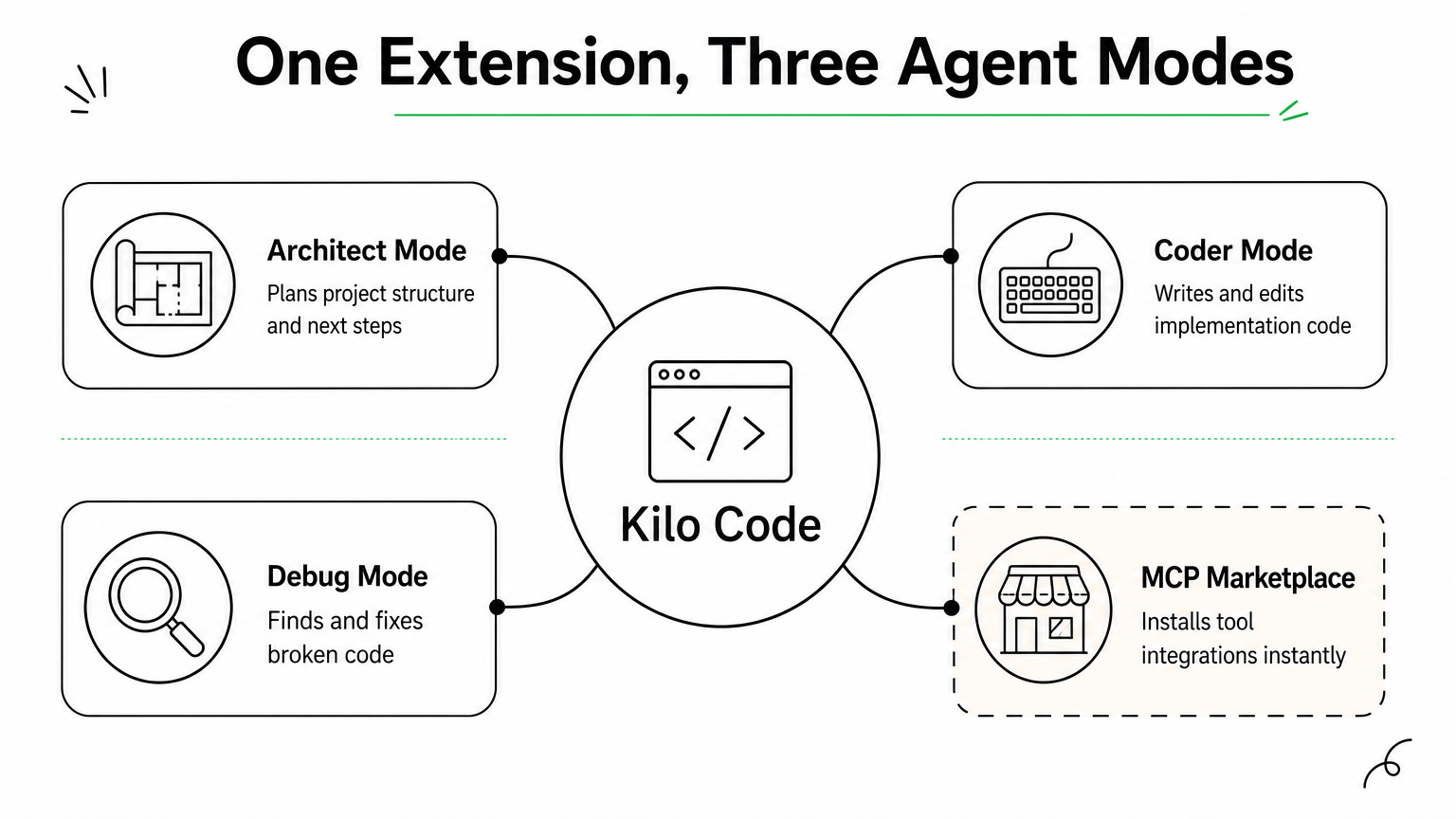
Kilo Code operates through distinct modes, Architect for planning, Coder for implementation, and Debug for troubleshooting, each tuned with different prompts and permissions for the task at hand. You switch modes depending on where you are in a project, and the agent adjusts its behavior accordingly rather than treating every request the same way. It also includes a built-in MCP marketplace, letting you browse and install tool integrations without hand-writing connector code yourself.
Kilo Code’s mode-switching means the agent behaves like planner, builder, or debugger depending on what the job actually calls for.
Who it’s for
Developers who bounce between VS Code and Cursor on different machines benefit most from Kilo Code’s cross-editor compatibility. It also suits teams that want structured agent modes rather than one generic chat loop, particularly when juniors need guardrails during implementation while seniors want faster architecture planning. Teams already invested in Roo Code or Cline will find the transition nearly frictionless.
Standout features
Kilo Code’s mode system and marketplace give it flexibility that single-purpose extensions lack.
- Multiple specialized modes: Architect, Coder, Debug, and custom modes you define yourself.
- Cross-editor support: Works in VS Code, Cursor, and Windsurf without separate builds.
- MCP marketplace: Install tool integrations directly from the extension.
- Checkpoint history: Step back through prior agent states when a change misfires.
Pricing and licensing
Kilo Code is open source and free to install from the VS Code Marketplace, with an optional hosted credit system for teams that don’t want to manage their own API keys. Self-hosted model connections remain free beyond whatever provider costs you incur.
7. Tabby for air-gapped code completion
Tabby takes a different angle than every agent above it on this list: instead of chasing autonomous task completion, it focuses on fast, private code completion you can run entirely disconnected from the internet. If your organization can’t send code to a third-party API for legal or security reasons, Tabby is one of the few open source ai coding agents built specifically for that constraint rather than treating it as an afterthought.
How it works
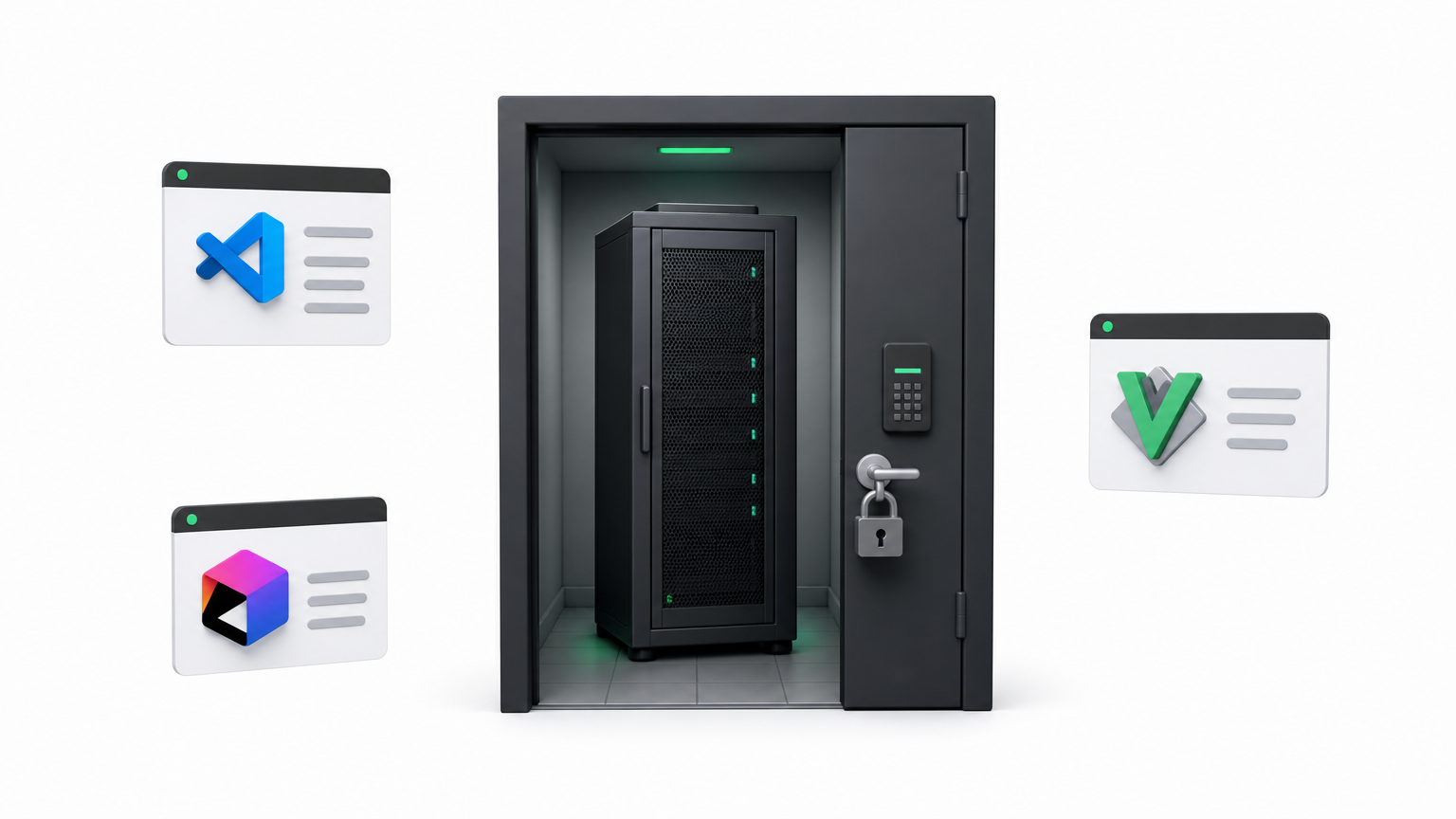
Tabby runs as a self-hosted server that serves code completions to IDE plugins for VS Code, JetBrains, and Vim, using open weight models like StarCoder or CodeLlama that you download and run on your own hardware. It indexes your private repositories locally, so completions are grounded in your actual codebase and naming conventions instead of generic public training data. Because nothing leaves your network, teams in regulated industries can deploy it inside an isolated VPC or even a fully air-gapped environment with no outbound connectivity at all.
Tabby’s real pitch isn’t smarter completions, it’s completions that never leave your building.
Who it’s for
Banks, healthcare providers, defense contractors, and any team under strict data residency requirements or AI governance and compliance obligations are the obvious audience here. Tabby also suits organizations that already run GPU infrastructure for other workloads and want to repurpose it for developer tooling instead of paying per-token fees to an external vendor.
Standout features
Tabby trades autonomous task execution for airtight privacy and predictable infrastructure costs.
- Fully offline operation: No API calls to external providers, ever.
- Self-hosted RAG over your codebase: Completions reference your actual repos, not just general patterns.
- Multi-IDE plugin support: One server backs VS Code, JetBrains, and Vim clients.
- Team analytics dashboard: Tracks completion acceptance rates across your engineering org.
Pricing and licensing
Tabby is released under Apache 2.0 and free to self-host indefinitely. Your only real cost is the GPU hardware needed to run the model, which scales with team size rather than usage volume.
8. SWE-agent for autonomous issue resolution
SWE-agent, built by researchers at Princeton and Stanford, was designed from the start to answer one question: can an agent take a raw GitHub issue and produce a working, tested fix without a human writing a single line? It’s less a product and more a research-grade tool that happens to work well enough for production use, which makes it one of the more academically rigorous open source ai coding agents on this list.
How it works
Instead of giving the agent unrestricted shell access, SWE-agent wraps everything in an Agent-Computer Interface (ACI), a purpose-built set of commands for viewing, editing, and searching files that’s tuned specifically for how language models reason about code. The agent reads an issue description, locates the relevant files using its search commands, edits them, runs the test suite, and iterates until tests pass or it hits a retry limit. This constrained interface is what drives its strong benchmark scores rather than raw model size.
SWE-agent proves that a narrower, well-designed toolset often beats giving an agent unrestricted access to your shell.
Who it’s for
Engineering teams with a large backlog of well-scoped bugs get the most value here, since SWE-agent shines on issues with clear reproduction steps and existing tests. Research teams benchmarking agent performance, and organizations building their own agent tooling on top of a proven ACI pattern, are also a strong match.
Standout features
SWE-agent’s benchmark pedigree and transparent design make it a reference point for anyone building custom agents.
- SWE-bench origin: The benchmark and the agent were developed together, so results are well-documented and reproducible.
- Configurable ACI: Swap in your own command set for different languages or repo structures.
- Trajectory logging: Full record of every command and observation for debugging or research.
- Model-agnostic: Works with GPT-4, Claude, and open weight models interchangeably.
Pricing and licensing
SWE-agent is MIT licensed and free to run, with model API costs as your only ongoing expense.
Picking the right agent for your stack
None of these eight tools is a universal answer, and that’s the point. OpenHands and SWE-agent push hardest on full autonomy for teams ready to hand over entire tickets. Cline, OpenCode, and Kilo Code meet you inside the editor or terminal you already use, with far less setup friction. Goose gives platform teams a runtime to shape, Aider keeps git at the center of every edit, and Tabby solves the one problem the others can’t: running completions where no code leaves your building.
Questions worth asking before you commit: does your team need autonomy or assistance? Does compliance require self-hosted, air-gapped tooling? Can your engineers maintain extensions, or do they need something that installs in minutes? Answer those honestly and the shortlist gets short fast.
If you’d rather skip the trial-and-error and get a recommendation matched to your actual codebase and compliance requirements, talk to Hatzs Dimensions about building a strategic roadmap for AI adoption.
هل تريدون تنمية أعمالكم؟
التصنيفات
الوسوم
صُمّم للجريئين
نساعد الشركات الطموحة على تحويل أفكارها إلى أنظمة ذكاء اصطناعي وبرمجيات ومؤسسات جاهزة للإنتاج. احصل على رؤى حول الذكاء الاصطناعي والأتمتة والتحول الرقمي تصلك مباشرة إلى بريدك الإلكتروني.
200+ حلاً تم تسليمها في 11+ قطاعاً، فلنبنِ معاً ما هو قادم.