












Picking from the current crop of AI coding agents is harder than it was a year ago. Cursor, Claude Code, Codex, and GitHub Copilot all claim to write, test, and ship code on their own. In practice they behave very differently. Some live in your editor and suggest changes line by line. Others run in a terminal or the cloud and work through a ticket while you do something else.
Here is the short answer. No single agent wins for every team. The right choice depends on how you work: inline editing, multi-file refactors, background tasks, or full feature delivery. Price and security controls matter too, especially if your code touches regulated data.
This list compares 10 AI agents for coding by workflow, so you can match a tool to the way your team builds. For each one, you’ll see what it does well, where it falls short, and who it fits. Our senior engineers at Hatzs Dimensions put these tools into production projects for clients, so the notes come from real delivery work, not feature pages.
1. How we compare AI coding agents
What an AI coding agent is
An AI coding agent takes a goal, plans the steps, edits files, runs commands, and checks its own results. That separates it from autocomplete, which only predicts the next few lines. AI powered coding agents read your repository, run your tests, and loop until the tests pass or the agent gets stuck.
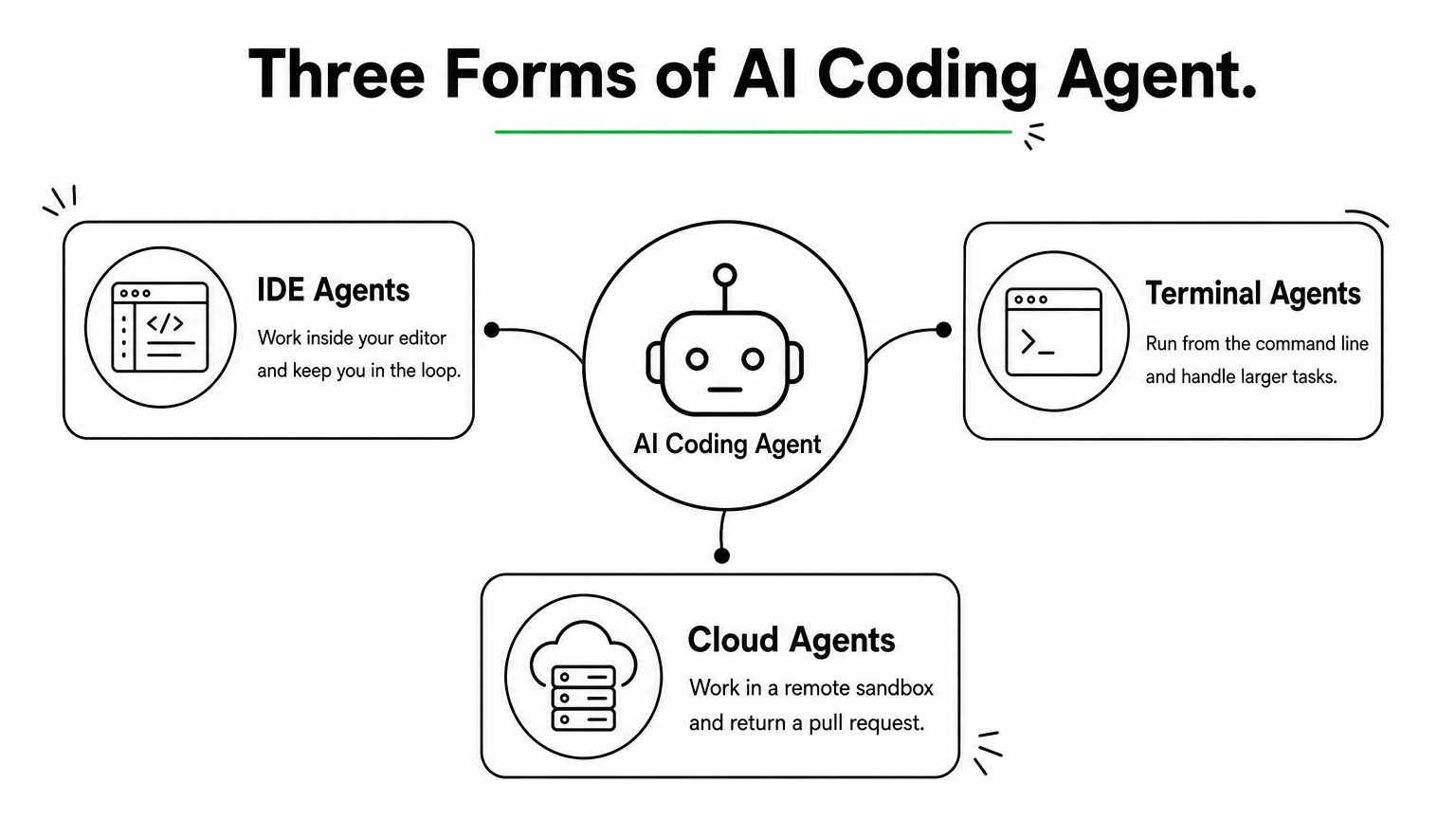
Three forms matter for this list. IDE agents work inside your editor and keep you in the loop. Terminal agents run from the command line and handle larger tasks. Cloud agents work in a remote sandbox and return a pull request. Many tools now offer more than one form.
Evaluation criteria and how we judged
Our senior engineers used each tool on real client work: feature builds, refactors, bug fixes, and test writing. We scored each agent on five criteria. We care most about how much of the output we actually merged, because a flashy demo means little if a human rewrites the result.
- Autonomy: how long it works without hand-holding.
- Context handling: how well it understands a large, messy codebase.
- Code quality: correctness, style fit, and test coverage.
- Control and safety: permissions, diffs, and rollback.
- Cost predictability: whether the bill stays stable under heavy use.
Judge an agent by how much of its work you merge, not by how much it writes.
Who it is for
This list is for CTOs, engineering leads, and founders who need to pick tools for a team, the same people wrestling with AI strategy that moves past the hype. It also helps individual developers who want to know where each agent fits. Regulated industries like banking and healthcare get extra attention in the governance checks near the end.
Your use case shapes the answer. Maybe you want an AI powered web development agent to speed up a React front end and its API layer, the kind of web application development work we ship every week. Maybe you need AI agents for coding that can refactor a legacy backend. The first calls for tight editor feedback. The second rewards long-running, autonomous work.
Pricing
Prices below reflect what vendors listed as of October 2026. Plans change often, so confirm on the vendor’s pricing page before you buy. Most tools use one of three models:
- Flat subscription: a fixed monthly fee per seat, usually with usage caps.
- Usage-based: you pay for model tokens through an API key, so heavy use costs more.
- Hybrid: a base subscription plus metered overage for premium models or long tasks.
For each tool we note the entry price and the point where costs tend to jump, since that is where budgets break.
2. Cursor
How it works
Cursor is a fork of VS Code with agents built in, so your extensions, themes, and keybindings carry over. Among AI coding agents, it is the one most developers try first. You describe a task in the chat panel, and the agent searches an index of your codebase, edits several files, and runs terminal commands. You review every change as a diff.
Project rules let you store conventions in your repo. That way the agent follows your style and architecture preferences in every session. Background agents can also take a task in the cloud and open a pull request while you keep working.
Strengths and limitations
Where Cursor shines is feedback speed. Tab completion, inline edits, and agent runs share one interface, so you never switch tools mid-thought. We merged more of its output on front-end and API work than on almost any other IDE agent.
- Strength: fast multi-file edits with clear, reviewable diffs.
- Strength: model choice, so you can pick a cheaper model for small tasks.
- Limitation: long autonomous runs drift more than terminal agents do.
- Limitation: you must leave your current editor, which some teams resist.
Cursor is the best pick when you want to stay in the loop while the agent does the typing.
Who it is for
It suits developers who think in the editor and want to review work as it happens. It also fits small product teams building an AI powered web development agent workflow for React, Next.js, or Node projects. If your tasks are big, unattended refactors, look at the terminal agents later in this list.
Pricing
Expect per-seat plans with usage limits, and heavier use pushes you into higher tiers. Prices below are what Cursor listed as of October 2026. Confirm them on Cursor’s pricing page before you buy.
| Plan | Price | Best for |
|---|---|---|
| Hobby | Free | Trying it out |
| Pro | $20/month | Daily individual use |
| Pro+ | $60/month | Heavy agent use |
| Ultra | $200/month | Power users |
| Teams | $40/user/month | Shared rules and admin controls |
Costs jump when developers run long agent sessions on premium models, so set spending limits early.
3. Claude Code
How it works
Claude Code is Anthropic’s terminal-based agent. You launch it inside a repository and give it a goal. It reads your files, edits code, and runs commands on its own. Extensions for VS Code and JetBrains let you use it from an editor too.
A CLAUDE.md file in your repo holds conventions, build commands, and test steps. The agent loads it every session, which keeps its work consistent across long tasks. Risky actions ask for permission unless you approve them in advance.
Strengths and limitations
Of all the AI coding agents we tested, this one handled large, tangled codebases best. It plans before it edits and stays on task through long refactors. We also script it in CI for chores like migrations and test generation.
- Strength: deep multi-file reasoning on legacy code.
- Strength: hooks, subagents, and MCP integrations for custom workflows.
- Limitation: no inline autocomplete, so you pair it with an editor.
- Limitation: subscription usage caps can bite on heavy days.
- Limitation: Claude models only.
Claude Code is the strongest pick when the task is big and you want to walk away.
Who it is for
Senior engineers and backend teams get the most from it. It fits unattended refactors, migrations, and bug hunts, where you would rather review a finished diff than watch every step. If you want constant visual feedback, Cursor suits you better.
Pricing
Access comes through a Claude subscription or through API billing. Prices below are what Anthropic listed as of October 2026. Confirm them on Claude’s pricing page.
| Plan | Price | Best for |
|---|---|---|
| Pro | $20/month | Light to moderate use |
| Max 5x | $100/month | Daily agent work |
| Max 20x | $200/month | Heavy, all-day use |
| API | Pay per token | Teams that want metered billing |
Costs jump when you run several long sessions a day on the top model. That is the point where Max or API billing makes sense, and where you should track usage per developer.
4. OpenAI Codex
How it works

Codex is OpenAI’s coding agent, and it comes in several forms. The cloud agent runs inside ChatGPT, where each task gets its own sandboxed container with your repository loaded. It edits files, runs tests, and returns a diff or pull request.
You can also run it locally. An open-source CLI and an IDE extension let you work from your terminal or VS Code. An AGENTS.md file stores your build commands and conventions, much like CLAUDE.md does for Claude Code.
Strengths and limitations
Parallel work is what sets Codex apart among AI coding agents. You can queue several tasks at once, step away, and review the finished diffs later. Each task runs in isolation, so one bad run cannot break another.
- Strength: parallel, sandboxed cloud tasks that return reviewable pull requests.
- Strength: bundled with ChatGPT plans, so many teams already own it.
- Limitation: cloud runs give slower feedback than an IDE agent.
- Limitation: the sandbox limits internet access by default, so tasks that need outside packages or services can fail.
- Limitation: OpenAI models only.
Codex is the best fit when you want to hand off a backlog, not pair on a single task.
Who it is for
Teams with a steady stream of well-scoped tickets benefit most. Think bug fixes, test coverage, dependency bumps, and small features. If your developers already pay for ChatGPT, they get Codex at no extra cost.
Skip it for exploratory work where you need to steer every step. For that, Cursor or Claude Code fits better.
Pricing
Access comes bundled with ChatGPT plans, or you can pay per token with an API key. Prices below are what OpenAI listed as of October 2026. Confirm them on OpenAI’s pricing page.
| Plan | Price | Best for |
|---|---|---|
| Plus | $20/month | Light to moderate use |
| Pro | $200/month | Heavy daily use |
| Business | Per user, see OpenAI | Shared workspaces and admin controls |
| Enterprise | Custom | Large, regulated teams |
| API | Pay per token | Metered billing in the CLI |
Costs jump when several developers queue many parallel tasks and hit plan limits. That is when Pro or API billing starts to make sense.
5. GitHub Copilot agent mode
How it works
Copilot’s agent mode runs inside your editor, including VS Code, Visual Studio, and JetBrains IDEs. You give it a goal, and it picks the files to change, edits them, and runs terminal commands. It reads the errors and tries again until the task works.
A separate cloud feature, the coding agent, starts from GitHub itself. You assign an issue to Copilot, and it works in a sandbox powered by GitHub Actions. It then opens a draft pull request for review. A copilot-instructions.md file in your repo stores your conventions.
Strengths and limitations
Distribution is the real advantage. Among AI coding agents, Copilot sits closest to your issues, reviews, and CI, so there is nothing new to adopt. It also lets you choose between models from OpenAI, Anthropic, and Google.
- Strength: lowest entry price on this list, plus mature admin controls.
- Strength: the issue-to-pull-request flow fits existing GitHub habits.
- Limitation: on large, tangled refactors it drifted more than Claude Code did.
- Limitation: premium requests are metered, so heavy agent use can exhaust your allowance.
Copilot is the easiest agent to roll out, even if it is not the most autonomous.
Who it is for
Teams already on GitHub get the fastest start, especially larger organizations that need central policy and audit controls. It also suits managers who want one vendor and one invoice. If your work is mostly big unattended refactors, pair it with a terminal agent.
Pricing
Individual plans start low, and business tiers add seat-level management. Prices below are what GitHub listed as of October 2026. Confirm them on GitHub’s Copilot plans page.
| Plan | Price | Best for |
|---|---|---|
| Free | $0 | Trying agent mode |
| Pro | $10/month | Daily individual use |
| Pro+ | $39/month | Heavy agent use, more premium requests |
| Business | $19/user/month | Teams needing policy controls |
| Enterprise | $39/user/month | Large, regulated organizations |
Costs jump when agent runs burn through the monthly premium request allowance. Overage is billed per request, so watch usage per seat from the first month.
6. Cline
How it works
Cline is an open-source extension for VS Code, with JetBrains and CLI versions as well. You bring your own API key from Anthropic, OpenAI, Google, or OpenRouter, or point it at a local model. It has a Plan mode and an Act mode. Plan mode reads your code and proposes steps. Act mode edits files and runs commands, and it asks for your approval at each step.
Checkpoints snapshot your workspace after every step, so you can roll back a bad change fast. A .clinerules file stores your conventions, and MCP servers let the agent call outside tools. Among AI coding agents, Checkpoints and approval prompts make Cline one of the easiest to supervise.
Strengths and limitations
Control is the draw. You see every prompt, every command, and every dollar spent, and you can swap models whenever one underperforms.
- Strength: no vendor lock-in, and free, open-source code you can inspect.
- Strength: local models keep code on your own hardware.
- Limitation: long sessions send large context, so token bills climb quickly.
- Limitation: frequent approval prompts slow you down, and there is no inline autocomplete.
Cline gives you the most control over models and costs, and you pay for that control with your own attention.
Who it is for
Developers who want model freedom get the most from it. It also fits security-minded teams that need self-hosted AI agents and local models for sensitive repositories. If you want one flat monthly bill and little tuning, Copilot or Cursor is simpler.
Pricing
The extension itself is free. Your real cost is model usage, and the table below shows where it lands. Confirm any team or enterprise plan on Cline’s site before you buy.
| Option | Price | Best for |
|---|---|---|
| Extension | Free | Everyone |
| Hosted models via API key | Pay per token | Flexible, metered use |
| Local models | Hardware cost only | Private code |
Costs jump when you run long sessions on premium models, since context grows with each step. Set a spending cap on your API key from day one.
7. Windsurf
How it works
Windsurf is an AI-native editor built on the VS Code foundation. Its agent, Cascade, tracks what you edit, run, and open, so it can infer your intent without a long prompt. It edits across files, runs terminal commands, and calls outside tools through MCP. Cognition, the company behind Devin, now owns it.
Rules hold the conventions you write. Memories hold what Cascade learns about your project. Together they carry context between sessions, so you repeat yourself less.
Strengths and limitations
Among AI coding agents, Windsurf is the gentlest on-ramp for developers new to agentic work. The interface is clean, and Cascade explains each step as it goes. The free tier is also actually usable, which is rare.
- Strength: context awareness cuts the effort you spend writing prompts.
- Strength: the lowest paid entry price among the IDE agents here.
- Limitation: usage runs on credits, and premium models burn them fast.
- Limitation: it pulls extensions from the Open VSX registry, so some Microsoft-only extensions are missing.
Windsurf is the cheapest way to try an IDE agent, as long as you watch your credits.
Who it is for
It suits developers who want a Cursor-style workflow at a lower price, and teams testing agents before committing budget. Junior and mid-level engineers tend to like how readable its steps are. For big unattended refactors, Claude Code or Codex is the better fit.
Pricing
Plans are per seat, with credits for agent actions. Prices below are what Windsurf listed as of October 2026. Confirm them on Windsurf’s pricing page.
| Plan | Price | Best for |
|---|---|---|
| Free | $0 | Trying Cascade |
| Pro | $15/month | Daily individual use |
| Teams | $30/user/month | Shared admin and billing |
| Enterprise | Custom | Large, regulated teams |
Costs jump when developers run long Cascade sessions on premium models and exhaust the monthly credits. Extra credits are sold separately, so review usage weekly before it surprises you.
8. Aider
How it works

Aider is an open-source pair programming tool that runs in your terminal. You start it inside a git repository, add the files you want changed, and describe the task in plain English. It edits those files and commits each change to git with a descriptive message.
A repo map built with tree-sitter gives the model a compact view of the wider codebase, so it can reference code in files you did not add. It can also run your linter and tests after each edit and try to fix failures. A CONVENTIONS.md file holds your style rules.
Strengths and limitations
Git discipline sets Aider apart among AI coding agents. Every edit becomes its own commit, so /undo reverts a bad change in seconds and your history stays readable. It also works with nearly any model, including local models through Ollama.
- Strength: a transparent, git-native workflow that is easy to review.
- Strength: model freedom, with token use that stays modest on small tasks.
- Limitation: less autonomous than Claude Code or Codex, because you choose the files and steer.
- Limitation: terminal only, with no graphical interface and more setup than an IDE agent.
Aider treats git as the safety net, which makes every change easy to review and easy to undo.
Who it is for
Developers who live in the terminal and want small, reviewable commits get the most from it. It suits cost-conscious engineers and open-source maintainers who want to pick their own model.
Skip it if you want to hand off a ticket and walk away. Codex or Claude Code handles that better.
Pricing
The software is free under the Apache 2.0 license, and you pay only for the model you connect. Rates below reflect what was true as of October 2026, so check your model provider for current token prices.
| Option | Price | Best for |
|---|---|---|
| Aider | Free | Everyone |
| Hosted models via API key | Pay per token | Flexible, metered use |
| Local models | Hardware cost only | Private code |
Costs jump when you add many files to the chat on a premium model, since every message resends that context. Use a cheaper model for small edits and cap your API spend from the start.
9. Gemini CLI
How it works
Gemini CLI is Google’s open-source terminal agent. You run it inside a repository, state a goal, and it reads files, edits code, and runs shell commands after you approve each action. Built-in tools add Google Search grounding and web fetching, and MCP servers connect it to outside services. A GEMINI.md file stores your conventions, much like CLAUDE.md does. Among AI coding agents, it offers the largest context window here, up to 1 million tokens with Gemini models.
Strengths and limitations
Generosity is the draw. The free tier lets you test a terminal agent on real work without entering a card, and the code is open under Apache 2.0. You can read the project on GitHub before you install it.
- Strength: the huge context lets it take in a mid-sized repository at once.
- Strength: free access and inspectable code.
- Limitation: on long multi-step refactors it lost the thread more often than Claude Code did.
- Limitation: Gemini models only, and free-tier data terms may not suit client code.
Gemini CLI is the lowest-risk way to try a terminal agent, as long as you read the data terms first.
Who it is for
Developers who want a free terminal agent get the most from it, as do teams already on Google Cloud. It also suits anyone who needs to feed a big codebase or long documentation into one session. Regulated teams should skip the free tier and use a paid plan with enterprise data controls.
Pricing
Access comes through a free personal Google account, a Google AI subscription, or a paid API key. Prices below are what Google listed as of October 2026. Confirm them on Google’s pricing pages before you buy.
| Option | Price | Best for |
|---|---|---|
| Free (personal Google account) | $0, daily request caps | Trying it out |
| Google AI Pro | $19.99/month | Higher limits for individuals |
| Google AI Ultra | $249.99/month | Heavy daily use |
| Gemini Code Assist (Standard, Enterprise) | Per user, see Google | Teams needing admin and data controls |
| API key | Pay per token | Metered billing |
Costs jump when you hit the free daily caps and move to API billing on a premium model. Track token spend before you roll it out to a team.
10. Devin
How it works
Devin is Cognition’s cloud agent, built to behave like a junior engineer instead of an assistant. Each session gets its own sandboxed workspace with a shell, editor, and browser. You assign work from Slack, the web app, or a Jira or Linear ticket.
From there, it plans the task, writes code, runs tests, and opens a pull request. You can message it mid-task to change direction. Among AI coding agents, it is the one closest to full delivery without a human in the loop.
Strengths and limitations
Autonomy is the pitch, and for well-scoped tickets it delivers. Devin can take a migration or a batch of repetitive fixes and return a pull request hours later, while your team works on something else.
- Strength: end-to-end ticket handling, from Slack message to pull request.
- Strength: parallel sessions, so one engineer can supervise several tasks.
- Limitation: vague tickets produce vague results, and it can burn compute going down a wrong path.
- Limitation: you still review every pull request, and cost is harder to predict than on flat plans.
Devin pays off only when your tickets are clear enough to hand off without a conversation.
Who it is for
Engineering leads with a backlog of routine, well-defined work get the most from it. Think version upgrades, test coverage, small bug fixes, and repeated changes across many repositories.
It is a poor fit for exploratory design work or tight feedback loops. For those, Cursor or Claude Code serves you better.
Pricing
Devin bills by Agent Compute Units (ACUs), where one unit covers roughly 15 minutes of active work. Prices below are what Cognition listed as of October 2026. Confirm them on Devin’s pricing page.
| Plan | Price | Best for |
|---|---|---|
| Core | Pay as you go, about $2.25 per ACU | Trying it on a few tasks |
| Team | About $500/month with 250 ACUs included | Shared use across a team |
| Enterprise | Custom | Large, regulated organizations |
Costs jump when sessions run long on unclear tasks. Write tight tickets and set ACU limits per session.
11. Side-by-side comparison and how to choose
Quick comparison table
Use this table to shortlist two or three AI coding agents before you run any trials. Prices are entry-level plans as of October 2026.
| Agent | Form | Best workflow | Entry price |
|---|---|---|---|
| Cursor | IDE | Inline multi-file edits | $20/month |
| Claude Code | Terminal | Large refactors | $20/month |
| OpenAI Codex | Cloud, CLI | Parallel backlog tasks | $20/month |
| Copilot agent mode | IDE, cloud | Issue-to-pull-request on GitHub | $10/month |
| Cline | IDE extension | Supervised, model-flexible work | Free, plus tokens |
| Windsurf | IDE | Low-cost IDE agent | $15/month |
| Aider | Terminal | Small, git-native commits | Free, plus tokens |
| Gemini CLI | Terminal | Huge context, free trial | Free |
| Devin | Cloud | Hand-off of clear tickets | About $2.25 per ACU |
Picking by workflow, team size, and budget
Start with how your team works, then check size and budget.
- Inline editing: Cursor, Windsurf, or Cline.
- Big unattended refactors: Claude Code.
- Backlog hand-off: Codex or Devin.
- GitHub-centered teams: Copilot agent mode.
- Free or open source: Aider or Gemini CLI, and a wider field of open source coding agents worth trying.
Most teams do best with one editor agent plus one autonomous agent. Together they cover quick edits and long-running tasks.
Pair one editor agent with one autonomous agent, and most workflows are covered.
Solo developers can start at $10 to $20 a month. Teams of ten or more should favor central billing and admin controls, such as Copilot Business or Cursor Teams. On a tight budget, Aider with a cheap model costs the least.
Security, privacy, and governance checks for teams
Run a security review before rollout, not after the first incident. Ask every vendor these questions:
- Does it retain or train on your code? Get the answer in writing.
- Can you limit which commands and files the agent can touch?
- Does it offer SSO and audit logs?
- Are secrets kept out of the repo and the agent’s context?
- Does a human approve every merge?
Regulated teams in banking or healthcare should use enterprise tiers or local models, log agent activity like any other privileged access, and fold the tooling into their AI governance and audit readiness program.
Picking the right agent for your team
The best AI coding agents are the ones your team actually merges code from. Match the tool to your workflow first: editor agents for inline work, terminal agents for big refactors, cloud agents for backlog hand-off. Then check price and security. Most teams land on one editor agent plus one autonomous agent, and that pairing covers nearly everything on this list.
Start small. Pick two or three tools from the comparison table and run them on a real ticket for a week. Measure how much output survives code review. Trials on live work tell you more than any benchmark or feature page.
If you want help choosing, rolling out, or governing these tools across a larger team, talk to the senior engineers at Hatzs Dimensions. We build custom software and AI agents that drive business outcomes every day, and we can help you turn an agent pilot into a reliable delivery process.
هل تريدون تنمية أعمالكم؟
التصنيفات
صُمّم للجريئين
نساعد الشركات الطموحة على تحويل أفكارها إلى أنظمة ذكاء اصطناعي وبرمجيات ومؤسسات جاهزة للإنتاج. احصل على رؤى حول الذكاء الاصطناعي والأتمتة والتحول الرقمي تصلك مباشرة إلى بريدك الإلكتروني.
200+ حلاً تم تسليمها في 11+ قطاعاً، فلنبنِ معاً ما هو قادم.