











The best enterprise AI agents are the ones that fit the systems you already run, respect your permissions, and leave an audit trail. For a Microsoft 365 shop, that is usually Microsoft Copilot Studio. Salesforce teams start with Agentforce, Google Cloud teams with Gemini Enterprise Agent Platform, and regulated firms with IBM watsonx Orchestrate. RPA-heavy teams look at UiPath, engineering-led teams at LangChain, and companies with unusual workflows at a custom build from a partner like Hatzs Dimensions.
The problem is that every vendor now says "agent." You are comparing products that range from a low-code builder for HR requests to a code framework for custom multi-agent systems. This article explains what enterprise AI agents are and how they work. Then it walks through seven options with the same lens: how each works, who it suits, what it costs, and where it falls short.
We build and ship AI agents into production for mid-sized and large companies. The judgments below come from integration work, governance reviews, and rollouts, not from vendor feature sheets. Where a price is not public, we say so instead of guessing.
What enterprise AI agents are and how they work
Enterprise AI agents are software systems that use a large language model to pursue a goal across your business tools, with the security, permissions, and audit logging a large organization requires. They plan steps, call systems such as your CRM or ticketing tool, and act, while people step in for approvals and exceptions.
What makes an agent enterprise-grade is not the model, it is the permissions, logging, and controls around it.
The loop: perceive, plan, act
Every agent runs the same loop. It perceives a trigger, such as a new invoice email or a support ticket. It plans by breaking the goal into steps and choosing tools. It acts by calling APIs, updating records, or drafting a reply, then checks the result and repeats until the work is done or a person takes over.
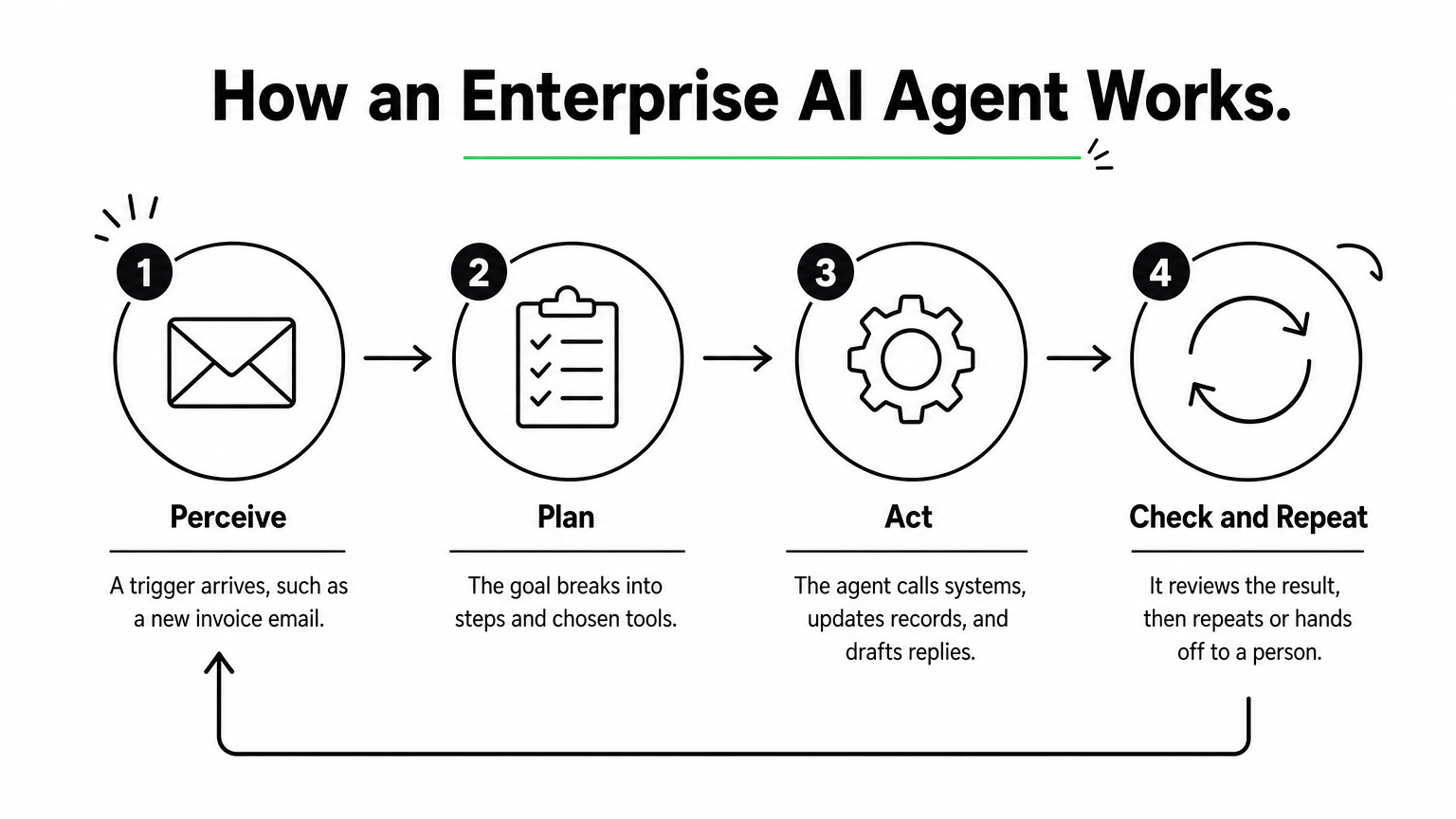
A plain chatbot stops at the answer. An autonomous AI agent keeps going until the task is complete. Four controls turn that loop into something an enterprise can run:
- Identity and permissions: the agent inherits the access of the user or role it serves, through SSO and role-based access control.
- Audit logs: every tool call and decision is recorded with who triggered it and what data it touched.
- Human approval: risky steps, such as payments or customer-facing replies, pause for a person.
- Data controls: masking, residency rules, and model access policies keep sensitive data inside approved boundaries.
How they differ from copilots, chatbots, and RPA
The main difference is who starts the work and how much of it the software can finish alone. The table sets the four common tools side by side.
| Tool | Who starts the work | Handles messy input | Typical scope |
|---|---|---|---|
| Chatbot | The user asks a question | Somewhat | Answers and FAQs |
| Copilot | The user prompts it | Yes | Drafts and suggestions inside one app |
| RPA bot | A schedule or trigger | No, needs fixed rules | Scripted clicks and data entry |
| Enterprise AI agent | A trigger, rule, or goal | Yes | Multi-step work across several systems |
In practice these layers combine. Many agents call RPA bots as one of their tools.
The seven types of AI agents
Textbooks classify agents by how they decide. Lists vary slightly, but these seven cover the usual answers.
| Type | How it decides | Enterprise example |
|---|---|---|
| Simple reflex | Fixed condition-action rules | Route tickets that contain a keyword |
| Model-based reflex | Rules plus a memory of current state | Track open orders and flag stalls |
| Goal-based | Plans steps toward an objective | Resolve an IT ticket end to end |
| Utility-based | Scores options and picks the best trade-off | Choose a carrier by cost versus speed |
| Learning | Improves from feedback | Fraud flags refined by analyst reviews |
| Hierarchical | A manager agent delegates to sub-agents | A finance agent splitting invoice tasks |
| Multi-agent system | Specialist agents collaborate | Onboarding with verification, provisioning, and compliance agents |
Most modern LLM-based enterprise agents are goal-based with tool access. The more ambitious deployments stack them into hierarchical or multi-agent setups.
1. Hatzs Dimensions
Hatzs Dimensions builds custom enterprise AI agents around your systems, data, and compliance rules instead of selling a fixed product. Choose it when no off-the-shelf platform matches your workflow.
Pick a custom build when your workflow is the competitive advantage, not a template.
How it works
Engagements follow four stages: discovery and planning, design and prototyping, development and testing, then deployment and support. The team covers AI agent design, GenAI consulting, data engineering and integration, and AI governance and compliance, so the agent, its data pipelines, and its controls come from one group.
Because the agents are custom, they can sit on top of whichever model, cloud, and systems of record you use. A senior-only engineering team with 7+ years of shipping enterprise AI into production does the build. One insurance client cut operations costs by 30%.
Who it suits and what it costs
It suits CTOs, CIOs, and product leaders at mid-sized and large companies, especially in insurance, banking, healthcare, and logistics. These are teams whose processes do not map to a vendor template, or who need one agent spanning several systems under strict governance.
AI agent pricing is scoped per engagement. You can pick dedicated teams when requirements will keep evolving, or fixed-price projects when you need budget certainty. There is no public price list.
Strengths and limits
- Strength: the agent is built around your data, workflows, and compliance needs, with less dependence on one vendor’s roadmap.
- Strength: strategy, design, AI, cloud, and long-term support come from one team, backed by 250+ clients and 98% retention.
- Limit: time to first value is longer than switching on a prebuilt agent.
- Limit: you need a business owner who can make product decisions during discovery.
2. Microsoft Copilot Studio
Microsoft Copilot Studio is a low-code builder for agents that live inside Microsoft 365, Teams, and the Power Platform. It is the quickest route to enterprise AI agents if your company already runs on Microsoft.
If your people already live in Teams and Outlook, the agent should live there too.
How it works
Makers describe an agent in natural language, attach knowledge sources and Power Platform connectors, and publish it to Teams, Microsoft 365, or a website. Identity runs through Microsoft Entra, so the agent respects the same sign-in and access rules as the rest of your tenant.
Administration sits in the Power Platform admin center. Policies there control which connectors makers can use and which data stays inside the tenant. Systems outside the Microsoft estate, such as SAP, Workday, or Salesforce, may need custom connectors.
Who it suits and what it costs
It suits IT-led teams and trained citizen developers in Microsoft-first companies. Typical builds are HR help desks, IT service requests, and internal knowledge agents.
Licensing is based on capacity and usage rather than a simple flat fee. Model it against your expected conversation volume. Microsoft adjusts the billing units from time to time, so confirm current terms before you budget.
Strengths and limits
- Strength: governance and identity are inherited from your Microsoft tenant, which shortens security review.
- Strength: low-code building lets non-engineers ship useful agents quickly.
- Limit: cross-system work outside Microsoft usually means extra engineering.
- Limit: usage-based costs are hard to forecast until you have real traffic.
3. Google Gemini Enterprise Agent Platform
Google Cloud’s Gemini Enterprise Agent Platform is a platform to build, scale, govern, and optimize agents, with model selection and tooling in one place. It fits cloud-first companies that already run data and applications on Google Cloud.
The platform earns its place when your data already lives in Google Cloud.
How it works
Google presents the platform as a single environment for choosing models, building agents, and governing them once they run. Google’s agent tooling has been known for grounding agents in enterprise data and handling multimodal input such as text, images, audio, and video.
If you have used Vertex AI, ask your Google Cloud representative how the new platform relates to your existing projects before you migrate. Do not assume one-to-one feature parity. Check the current documentation for model availability, regional deployment, and compliance certifications.
Who it suits and what it costs
It suits data-heavy organizations on Google Cloud that have an ML or platform engineering bench. Think document analysis, visual inspection, or agents sitting on BigQuery data.
Pricing is consumption-based, so cost depends on model usage, volume, and regions. Plan for someone to own cost monitoring, because token-heavy agents can grow expensive without limits in place.
Strengths and limits
- Strength: deep fit with Google Cloud data services and a broad choice of models.
- Strength: governance and scaling features sit alongside the build tools.
- Limit: teams without engineering depth may struggle with cost tuning and model management.
- Limit: value drops if your systems of record live elsewhere.
4. Salesforce Agentforce
Salesforce Agentforce puts agents directly on your Salesforce data and workflows. It is the natural choice among enterprise AI agents when the CRM is where customer work happens.
An agent that reads live CRM records beats one that reads a nightly copy.
How it works
Agents operate on Salesforce’s own data model, so they work with current records and no synchronization layer. They can trigger and respond to Salesforce Flow automations. The Einstein Trust Layer applies data masking and filtering before a request reaches a model.
Every action is logged inside Salesforce. When an agent cannot resolve a case, it escalates to a person in Service Cloud with the conversation context attached.
Who it suits and what it costs
It suits sales, service, and marketing operations teams that treat Salesforce as the system of record. Lead qualification, case triage, and CRM hygiene are the common first uses.
Agentforce is sold as an add-on to Salesforce, with usage-based pricing. Salesforce has changed its pricing models over time, so get a current quote and compare it against your expected volume of agent actions.
Strengths and limits
- Strength: inherited permissions, sharing rules, and audit trails from the Salesforce platform.
- Strength: fast deployment for teams already configured on Salesforce.
- Limit: orchestration across ERP, HR, and ITSM systems often needs MuleSoft or custom API integration work.
- Limit: it adds little if your customer data lives in another CRM.
5. IBM watsonx Orchestrate
IBM watsonx Orchestrate is built for regulated enterprises that need explainable, auditable automation across HR, procurement, and IT. It stands out among enterprise AI agents for how much weight it puts on traceability.

When a regulator might ask why the agent did that, traceability is the feature.
How it works
The platform orchestrates agents and tools through a catalog of pre-built agents and skills, with integrations for systems such as SAP, Salesforce, and ServiceNow. Each action can be traced back to the data, rules, and model reasoning behind it.
Governance is a first-class part of the product, not an add-on. That matters for audit teams, who can review decision trails without asking engineers to reconstruct them.
Who it suits and what it costs
It suits banks, insurers, healthcare providers, and other large organizations where compliance review is a gating step. It also suits companies with sprawling back-office systems that need one orchestration layer.
Pricing is negotiated at the enterprise level. Expect a longer procurement and implementation cycle than a SaaS-native option, and budget for it.
Strengths and limits
- Strength: audit and explainability depth that suits regulated workflows.
- Strength: pre-built integrations with common enterprise systems.
- Limit: slower to deploy than agents native to a system you already use.
- Limit: heavier than needed for a small team with a few simple workflows.
6. UiPath AI agents
UiPath adds language-model agents to the automation platform many enterprises already use for RPA. If you have hundreds of existing robots, enterprise AI agents from UiPath let you add reasoning without starting over.
The cheapest agent is the one that reuses automations you already trust.
How it works
An agent decides and extracts, while UiPath robots execute. Orchestrator handles scheduling, access, and audit trails. Action Center routes exceptions to people with full context, and Document Understanding reads invoices, forms, and contracts.
That mix is useful for processes that cross modern APIs and legacy desktop applications. The agent handles the unstructured judgment, and the robots handle the clicks.
Who it suits and what it costs
It suits enterprises with an established UiPath footprint and process teams who already know its tooling. Finance operations, claims processing, and back-office document work are typical fits.
Licensing is layered across robots, AI services, and orchestration, which makes cost modeling harder than a per-user plan. Ask for a bundled estimate based on the processes you actually plan to automate.
Strengths and limits
- Strength: reuse existing robots, queues, and exception handling.
- Strength: mature document understanding and a broad connector marketplace.
- Limit: its desktop heritage means cloud-only environments may need extra engineering.
- Limit: resilient cross-system agents often require experienced UiPath developers.
7. LangChain with LangGraph
LangChain and its LangGraph framework are open source toolkits for engineering teams that want to code and own their agent stack end to end. They give the deepest control of any option here, in exchange for the most work.

A framework gives you control, and you pay for it in engineering hours.
How it works
Developers define agent logic, tools, memory, and multi-step graphs in code, in languages such as Python and TypeScript. LangSmith, the commercial layer, adds tracing, evaluation, and deployment, which helps you debug long, branching agent runs. Alternatives such as CrewAI take a similar code-first approach, focused on role-based agent teams.
Nothing about security or compliance comes preconfigured. You choose the hosting, the access controls, and the logging, which suits teams with strong opinions about all three.
Who it suits and what it costs
It suits engineering-led enterprises with a platform team, custom requirements, and a willingness to maintain what they build. It does not suit teams that want business users to build agents themselves.
The frameworks are free. LangSmith has a free developer tier and paid seat-based plans, plus custom enterprise terms. The real cost is engineer time, hosting, and the governance layer you have to build.
Strengths and limits
- Strength: maximum flexibility over models, tools, and agent behavior, with strong observability.
- Strength: no dependence on one vendor’s application ecosystem.
- Limit: SLAs, security, and compliance are your responsibility.
- Limit: non-technical colleagues cannot contribute directly to agent design.
How to compare and shortlist enterprise AI agents
Shortlist by your system of record first, then by governance needs, then by how much engineering you can commit. Most enterprise AI agent decisions are settled by those three, not by model quality.
Start with where your data lives, because the agent has to live next to it.
Comparison at a glance
| Option | Best fit | Build effort | Pricing model |
|---|---|---|---|
| Hatzs Dimensions | Custom, multi-system workflows | Partner-led | Fixed-price or dedicated team |
| Microsoft Copilot Studio | Microsoft 365 and Azure estates | Low-code | Capacity and usage |
| Gemini Enterprise Agent Platform | Google Cloud data and ML teams | Medium to high | Consumption |
| Salesforce Agentforce | Salesforce-centered customer work | Low to medium | Usage-based add-on |
| IBM watsonx Orchestrate | Regulated, audit-heavy enterprises | Medium | Negotiated contract |
| UiPath AI agents | Existing RPA estates | Medium | Multi-SKU licensing |
| LangChain with LangGraph | Engineering-led custom stacks | High | Free frameworks, paid tooling |
Six questions to ask every vendor
Run the same checklist against each option. Gaps show up fast.
- Where does the agent get its permissions, and can it ever exceed the user’s?
- Can you see every tool call and decision in a log your auditors can read?
- Where does data go, and what residency and masking controls exist?
- Which steps require human approval, and can you configure them per workflow?
- Can you switch or add models without rebuilding the agent?
- How is usage metered, and what does a month of real traffic cost?
The big four and the top three
No official ranking names a "big four" or a "top three." The four large vendors that appear on most enterprise shortlists are Microsoft, Google, Salesforce, and IBM, because each owns a cloud, a suite, or a system of record. If you need three starting points, take the one that matches your estate: Copilot Studio for Microsoft, Agentforce for Salesforce, and Google’s platform for Google Cloud. Treat them as starting points, not verdicts.
Choosing your first enterprise agent platform
Pick the platform that sits closest to your data, check it against the six governance questions, and start with one contained workflow. Native platforms win on speed when your systems line up. Frameworks win on control when you have engineers to spare. A custom build wins when the workflow itself is what sets you apart.
If your processes span several systems, or your compliance team needs controls that off-the-shelf tools do not offer, a senior build partner can save months of rework. You can plan your enterprise AI agent with the Hatzs Dimensions team and start with a scoped first workflow.
Want to grow your business?
Categories
Designed for the Bold
We help ambitious companies turn ideas into production-ready AI, software, and enterprise systems. Get insights on AI, automation, and digital transformation delivered to your inbox.
200+ solutions delivered across 11+ industries — let's build what's next.