











To build AI agents, pick one narrow job, choose a build path (a no-code platform or a code SDK), give a language model clear instructions and a few tools, then test it on real cases with guardrails and a human fallback before it acts alone. A first working agent takes an afternoon, not a quarter. The hard part is scope, not technology.
Most beginners get stuck because the search results mix everything together. You find videos, framework docs, forum threads and vendor pitches, and they use "agent" to mean anything from a chatbot to a fully autonomous system. People then start with multi-agent frameworks, memory and planning before a single tool call works. The result is a demo that looks impressive and breaks on the first real request.
This guide walks you through creating AI agents in four steps, with working code and a no-code route. You will learn what an agent is, how to scope a first job, how to choose tools, how to build the agent, and how to test it safely. At Hatzs Dimensions we build agents for businesses, so the advice below comes from where first builds tend to fail.
What an AI agent is and what you need first
An AI agent is a system that uses a language model to decide what to do next and then acts through tools, repeating until the job is done. A chatbot answers a question. An agent takes a goal, picks a step, calls a tool, reads the result and picks the next step.
What makes a program an agent
Every agent has three parts, whether you build it in code or on a no-code platform:
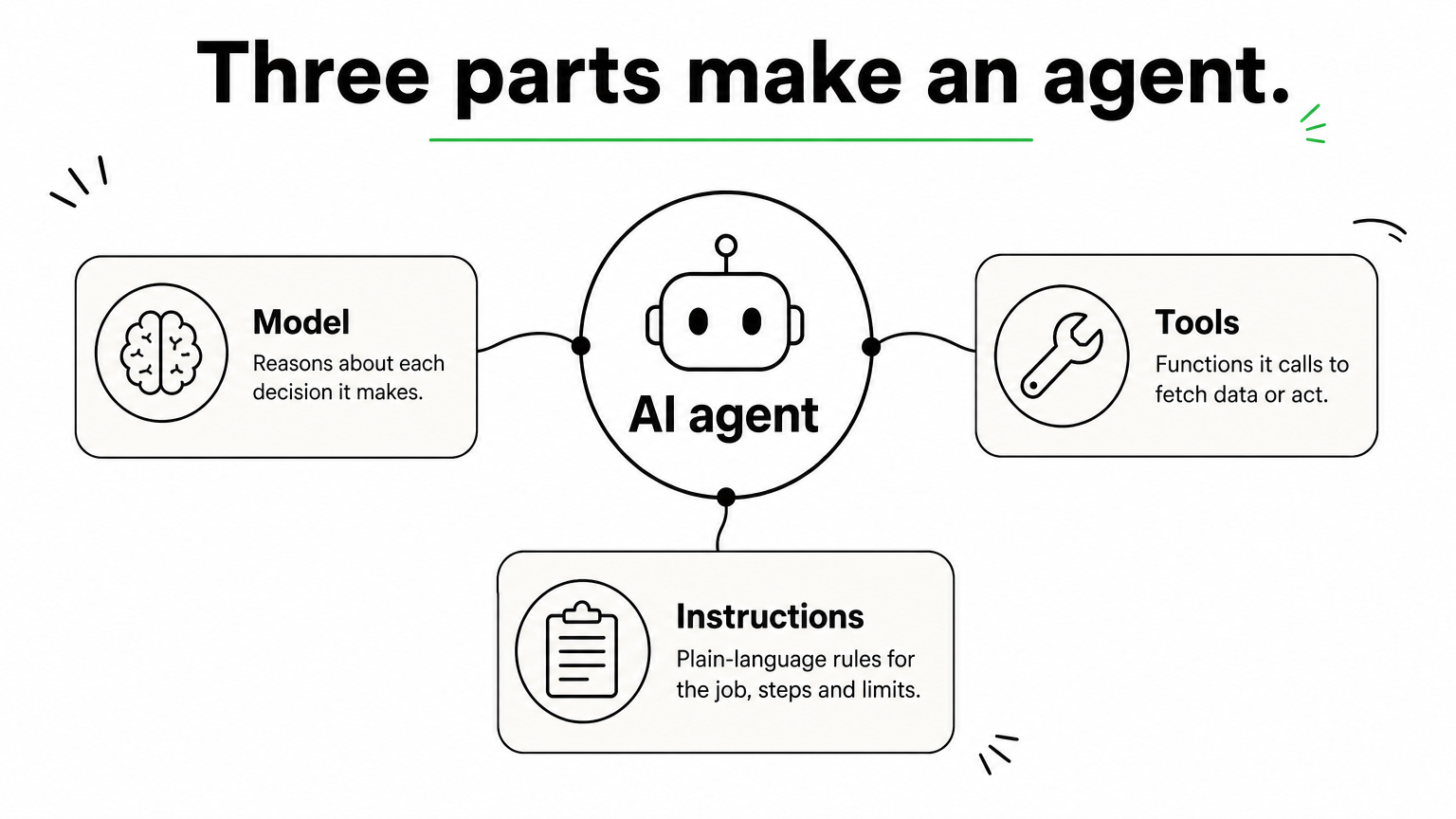
- Model: the language model that reasons and makes decisions.
- Tools: functions or APIs the agent can call, either to fetch data (a database lookup, a web search) or to act (send an email, update a CRM record).
- Instructions: plain-language rules that define the agent’s job, its steps and its limits.
A language model on its own only produces text. It never runs a tool itself. It returns a structured request such as "call get_order_status with order 1001", your code runs the tool, and the result goes back to the model. That decide, act, observe, repeat loop is what separates an agent from a single prompt.
An agent is a language model inside a loop, with tools it can call and rules it must follow.
Agent types you will hear about
Textbooks list five classic types: simple reflex, model-based reflex, goal-based, utility-based and learning agents. Some lists add hierarchical and multi-agent systems to reach seven. You do not need to pick one. A tool-using agent built on a language model is a goal-based agent in practice, because you give it a goal and it chooses the steps.
What you need before you start
Gather five things before you write anything:
- One specific job you want automated.
- An account with a model provider or a no-code platform, plus an API key if you code.
- Ten to twenty real example inputs for that job.
- Access to the system your first tool will touch, ideally read-only.
- A few hours of uninterrupted time.
A first agent costs little. The main running cost is model usage, which scales with the number of model calls per run times the number of runs. If one run makes four model calls and you handle 2,000 runs a month, that is 8,000 calls a month. Multiply that by your provider’s per-call price on its pricing page. Custom builds that connect to many systems cost more because integrations and testing take most of the effort, not the model.
Step 1. Pick one narrow job
Choose a single workflow that has several steps, depends on judgment, and is awkward to automate with fixed rules. If a simple script or a rules engine can do the job, use that instead. An agent earns its place where the input is messy and the right next step depends on context.

Choose a workflow that suits an agent
Three signs point to a good fit. Complex decisions are involved, such as approving a refund based on the order, the customer history and the policy. The rules are hard to maintain, so every exception means another patch. Or the input is unstructured, like emails, documents or free-text requests.
Good first jobs include triaging a support inbox, turning an emailed to-do list into a calendar schedule, checking an order status and drafting a reply, or summarizing new leads and updating a CRM. Pick something where a mistake is cheap to undo. You will build trust in the agent before you give it anything risky.
Write a one-page job spec
Fill this in before you open any tool. It becomes the backbone of your instructions in Step 3.
Job: Answer order-status questions from customers by email
Trigger: A new email arrives in the support inbox
Inputs: Email text, customer email address
Tools: get_order_status (read-only), draft_reply (saves a draft)
Allowed actions: Look up orders, draft replies
Never do: Issue refunds, change orders, promise delivery dates
Done when: A draft reply is saved, or the case is handed to a human
Hand off to a human when: Order not found after two tries, customer is angry, any refund request
The "never do" and "hand off" lines matter most. They are your first guardrails, and writing them now costs nothing.
Scope your first agent so small that you can describe its entire job in one page.
Step 2. Choose how you will build
Choose by your skills and by what the agent must connect to. If you do not code, start with a no-code platform. If you are a developer, use an SDK. If you want to understand the mechanics, write the loop yourself once.
No-code, low-code or code
| Path | Examples | Best for | Skill needed |
|---|---|---|---|
| No-code automation | n8n, Zapier | Agents triggered by email, forms or schedules | None to light |
| Vendor agent builders | Microsoft Copilot Studio, custom GPTs in ChatGPT | Assistants inside tools you already use | Light |
| Code with an SDK | OpenAI Agents SDK, Claude API with tool use | Custom logic and your own systems | Python or JavaScript basics |
| Plain loop from scratch | Python or Node plus any model API | Learning and full control | Programming |
n8n gives you more control than Zapier, while Zapier is easier to learn. Both let you connect an AI step to Gmail, Google Calendar and hundreds of other apps. Many no-code platforms have a free tier, so check current terms before you commit.
Pick a model
Any model with tool calling support can power an agent. OpenAI, Anthropic’s Claude and Google’s Gemini models all qualify, and so do many open models. The same process applies to building AI agents with ChatGPT, Claude or Copilot: you supply instructions and tools, and the model decides when to call them.
Start with the most capable model available to set a quality baseline. Once the agent works, swap in a smaller, cheaper model for the simple steps and see whether results hold. This way you never blame a weak model for a problem that sits in your instructions. If you want to build AI agents from scratch for free, run a model locally with Ollama, which serves a model on your machine through an API.
Prototype with the strongest model, then trade down for cost and speed only after the agent works.
Step 3. Build your first agent
Build the smallest version that does the job end to end: instructions, one tool, one run. You can do it in about 40 lines of Python or in a no-code workflow with four nodes. Add more tools only after this version works.

Write the instructions
Instructions drive agent behavior more than any other setting. Turn your job spec into numbered steps and make every step a concrete action. Cover the edge cases explicitly, such as what to do when the order ID is missing.
You are a customer support agent for an online store.
Your job is to answer order-status questions.

1. If the customer has not given an order ID, ask for it. Do not guess.
2. Call get_order_status with the order ID.
3. If the order is found, reply with its status, carrier and estimated delivery date.
4. If the order is not found, ask the customer to check the ID once. If it still fails, say a human will follow up.
5. Never offer refunds, changes or delivery promises. If asked, say a human will follow up.
Build it in code
This example uses the OpenAI Agents SDK. Install it with pip install openai-agents, set your OPENAI_API_KEY environment variable, and run the file. The tool here reads from a small dictionary so you can test without a real system.
from agents import Agent, Runner, function_tool

ORDERS = {
    "1001": {"status": "shipped", "carrier": "UPS", "eta": "Oct 21"},
    "1002": {"status": "processing", "carrier": "none yet", "eta": "Oct 24"},
}

@function_tool
def get_order_status(order_id: str) -> str:
    """Look up the status of an order by its order ID."""
    order = ORDERS.get(order_id)
    if order is None:
        return "No order found with that ID."
    return (f"Order {order_id}: {order['status']}, "
            f"carrier {order['carrier']}, estimated delivery {order['eta']}")

agent = Agent(
    name="Order support agent",
    instructions=(
        "You are a customer support agent. Ask for the order ID if it is missing, "
        "call get_order_status, and reply with the status. Never offer refunds."
    ),
    tools=[get_order_status],
)

result = Runner.run_sync(agent, "Hi, where is order 1001?")
print(result.final_output)
Behind that one call, the SDK runs the loop for you. The model asks for the tool, your function runs, the result returns to the model, and the model writes the final answer. The tool’s docstring and type hints become the tool description the model reads, so write them clearly.
Build it with no-code
Here is the same idea in n8n, using an email-driven agent as the example:
- Add a trigger node, such as a new email in Gmail.
- Add an AI Agent node and connect it to your chosen chat model.
- Paste your numbered instructions into the agent’s system message.
- Attach tools: a lookup for your data (a spreadsheet or HTTP request) and an action such as saving a draft.
- Run the workflow with one of your sample emails and read each step’s output.
A first workflow like this typically takes a couple of hours, mostly spent connecting accounts.
Get one tool working end to end before you add a second.
Step 4. Test, add guardrails and ship
Run the agent against your real examples, add guardrails around anything risky, and keep a human in the loop until the results hold. Agents fail in ways that only show up on messy input, so testing is where most of the work in AI agent development sits.
Test on real cases
Take the 10 to 20 examples you collected and add the awkward ones: a missing order ID, a wrong ID, an angry customer, an off-topic question, a request for a refund. Run each one and record whether the agent did the right thing. Change one thing at a time, either the instructions, a tool description or the model, so you know what helped.
When the agent picks the wrong tool or ignores a step, the fix is usually clearer instructions or a sharper tool description. Do not reach for a bigger architecture yet. If you can, save your test cases and rerun them after every change.
Add guardrails and a human fallback
Layer several simple protections rather than relying on one. Start with tool safety: give read-only tools first, and require approval for anything that sends, pays, deletes or changes records. Add input checks for off-topic requests and prompt injection, and filter outputs that might expose personal data.
Then define when the agent hands off to a person. Two triggers cover most cases: the agent fails repeatedly (for example, it cannot identify what the customer wants after two attempts), or the action is high-risk or irreversible, such as a large refund. Early in deployment, review a sample of the agent’s work every day.
When to scale up or bring in help
Stay with a single agent as long as you can. Split into multiple agents only when instructions turn into a tangle of if-then branches, or when the agent keeps choosing between tools that overlap. A manager agent that calls specialist agents is the usual next pattern.
Production brings new demands: connecting to your CRM or ERP, handling permissions, meeting compliance rules and monitoring behavior over time. That is where custom AI agent development with a partner can save months. Hatzs Dimensions builds agents that carry out multi-step tasks, connect to internal tools and answer from your own company knowledge. Its fixed-price model sets scope, timeline and budget upfront, which suits a well-defined first agent.
Earn autonomy in stages: read-only first, drafts second, real actions last.
Start with one job and one tool
You now have the full path: understand the loop, scope one narrow job, choose a no-code or code route, build a version with a single tool, then test and add guardrails before the agent acts alone. Resist the urge to add memory, planning and extra agents until the simple version works reliably on real cases.
Take your own workflow, fill in the one-page job spec and build the small version this week. If your first agent needs to connect to company systems, run on sensitive data or meet compliance requirements, talk to Hatzs Dimensions about your AI agent project.
هل تريدون تنمية أعمالكم؟
التصنيفات
صُمّم للجريئين
نساعد الشركات الطموحة على تحويل أفكارها إلى أنظمة ذكاء اصطناعي وبرمجيات ومؤسسات جاهزة للإنتاج. احصل على رؤى حول الذكاء الاصطناعي والأتمتة والتحول الرقمي تصلك مباشرة إلى بريدك الإلكتروني.
200+ حلاً تم تسليمها في 11+ قطاعاً، فلنبنِ معاً ما هو قادم.