










AI agent hosting is the infrastructure that keeps an AI agent running after the demo: the servers or cloud runtime, model access, memory, security controls and monitoring that let it work around the clock. You can host an agent on a managed cloud platform, on a server you control, or with a partner who runs it for you. Each option trades control against effort and cost.
This guide explains why hosting decides whether an agent survives in production, then compares the three hosting models side by side. It covers what to check on security, compute and cost, and walks through a step-by-step deployment plan. It ends with how Hatzs Dimensions builds and hosts AI agents for US businesses.
Why AI agent hosting matters
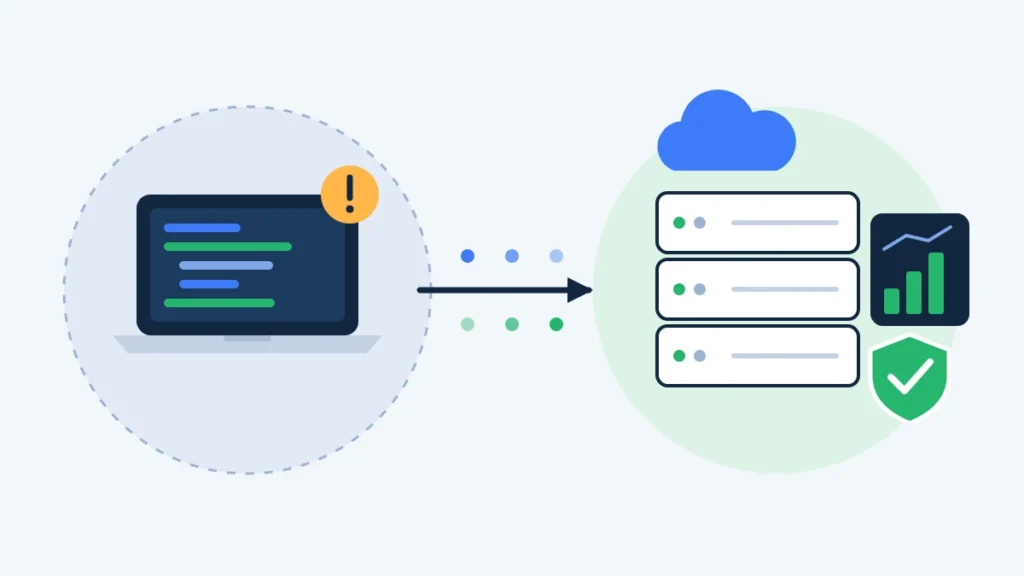
AI agent hosting matters because an agent that only works on a developer’s laptop creates no business value. Production means it must run on schedule, reach your systems safely and recover when something fails.
From prototype to production
A prototype hides problems that real traffic exposes: slow responses, expired API keys, a tool that returns an error at 2 a.m. Gartner has forecast that more than 40% of agentic AI projects will be canceled by 2027, with rising costs and unclear value among the main reasons. Weak operations are a big part of that gap.
Hosting is where those problems get solved. It is also where cost, security and uptime are decided.
What hosting has to cover
A production setup needs more than a server. Plan for these pieces:
- Runtime: the container or service where the agent code runs.
- Model access: a hosted model API, or a model you run yourself.
- Memory and state: a database or vector store so the agent remembers context.
- Tool access: secure connections to your CRM, ERP, inbox and internal APIs. See how AI agent integrations work.
- Secrets and permissions: API keys stored safely, with least-privilege access.
- Monitoring: logs, alerts and evaluation so you know when output quality drops.
Hosting is not an afterthought. It decides whether an agent keeps working after launch day.
The three AI agent hosting models
The three main options are managed cloud platforms, self-hosted servers and a partner-managed setup. Most teams pick based on how much control they need and how much infrastructure work they can absorb.
| Hosting model | Who runs the infrastructure | Control | Setup effort | Best fit |
|---|---|---|---|---|
| Managed cloud platform | The cloud vendor | Medium | Low to medium | Teams already committed to one cloud |
| Self-hosted (VPS, containers, Kubernetes) | Your team | High | High | Privacy-sensitive or cost-sensitive workloads |
| Partner-managed hosting | A specialist team | Shared | Low | Businesses that want results without an in-house ops team |
Managed cloud agent platforms
The big three clouds each offer a managed runtime for agents: AWS Bedrock AgentCore, Microsoft Foundry Agent Service (formerly Azure AI Agent Service) and Google Vertex AI Agent Engine. They handle scaling, session memory and guardrails for you.
The catch is fit. Each one ties tightly into its own cloud’s identity, data and security tools. That is a strength if your company already runs on that cloud, and a lock-in risk if it does not. Moving agent state between them is rarely clean.
For a wider look at tools, read our guide to AI agent platforms.
Self-hosted AI agents
Self-hosting means the agent runs on a server you control, such as a virtual private server (VPS), your own cloud account or an on-premise machine. You keep full control of data and avoid vendor lock-in. You also own the patching, backups, uptime and security.
This walkthrough shows the basic VPS route, from building a small agent to deploying it on a server and scheduling it:
A single VPS suits small, scheduled agents. Larger workloads usually move to containers or Kubernetes. Our deep dive on self-hosted AI agents covers the privacy case, and open-source AI agents lists frameworks you can run yourself.
Partner-managed hosting
A third route is to have a specialist team design, deploy and operate the agent for you. You get the control of a dedicated setup without hiring a platform team. This is the model many mid-size US businesses choose when AI agents must run reliably but infrastructure is not their core work.
Pick the hosting model that matches your team’s skills, not the one with the longest feature list.
What to check before you choose AI agent hosting
Check security, compute, uptime, monitoring, compliance and cost before you commit. A wrong choice is expensive to undo once agents hold state and connect to live systems.
| Check | Question to ask |
|---|---|
| Security | Where do secrets live, and what can the agent touch? |
| Compute | Do we call a hosted model API, or run models ourselves? |
| Uptime | What happens when a tool, model or server fails? |
| Monitoring | Can we see logs, errors and quality over time? |
| Compliance | Does the setup meet our data-residency and audit needs? |
| Cost | What do we pay at 10x today’s usage? |
Do you need GPUs?
Only if you run open models yourself. An agent that calls a hosted model API needs ordinary CPU servers, because the heavy computing happens at the model provider. GPUs matter when privacy rules or volume push you to host the model too.
Security for agents that take actions
Agents act, so the risk is higher than with a chatbot. Give each agent the minimum permissions it needs. Keep API keys in a secrets manager, never in code. Run agents that execute generated code in isolated sandboxes, and require human approval for high-risk actions such as payments or deletions. Log every action so you can audit it later. Strong data governance makes all of this easier.
What drives AI agent hosting cost
Costs depend on your setup, but these are the usual drivers:
- Model usage: tokens or API calls are often the largest line item.
- Compute: servers, containers and any GPUs.
- Storage: databases and vector stores for memory.
- Monitoring and security tooling.
- Engineering time to maintain it all.
Track cost per task from day one, and review it as usage grows.
Model usage usually costs more than the server, so measure cost per completed task, not cost per month.
How to host an AI agent in production, step by step
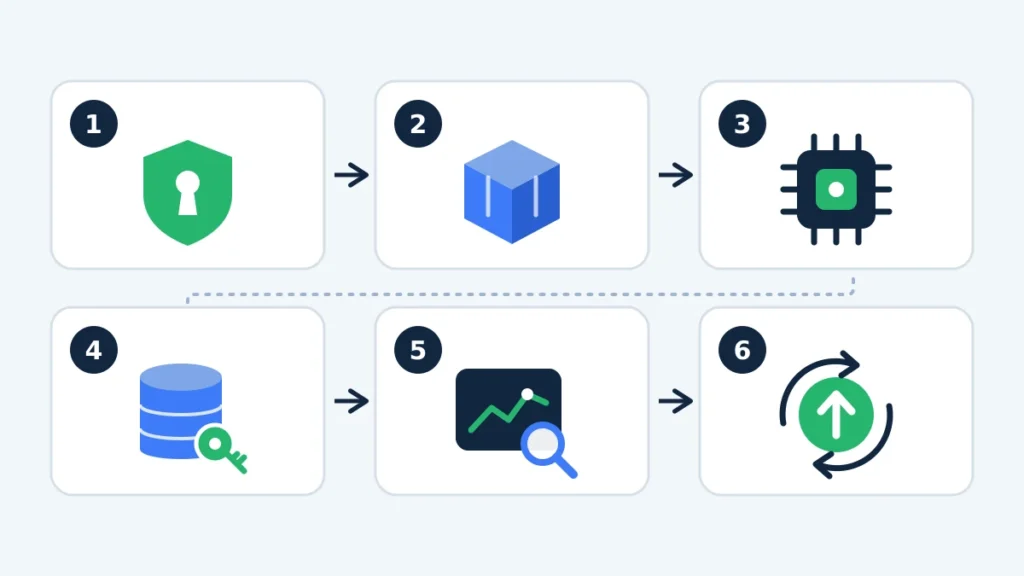
Hosting an AI agent in production comes down to six steps, from defining scope to scaling safely. This lesson from Microsoft’s open course covers evaluation, error handling and cost management for production agents:
- Define scope and permissions. Write down what the agent may read, write and trigger.
- Choose the runtime. Use containers so the same build runs in testing and production.
- Set up model access. Pick a hosted API or your own model, with a fallback if it is down.
- Add state and secrets. Store memory in a database and keys in a secrets manager.
- Add monitoring and evaluation. Track errors, latency, cost and answer quality against a baseline.
- Deploy with rollback. Release through a pipeline so you can revert fast, then scale one workflow at a time.
Start with one agent and one measurable goal. Widen scope only when the numbers justify it. For the business case, see AI agents for business and how larger firms approach enterprise AI agents.
How Hatzs Dimensions hosts AI agents
Hatzs Dimensions builds custom AI agents and runs them on cloud infrastructure for US businesses. One team covers the agent and the platform underneath it, so nothing falls between vendors.
- Agent build: custom agents connected to your CRM, ERP and internal tools.
- Deployment: Cloud Engineering and CloudOps & DevOps for secure, automated releases.
- Ongoing operations: Support & Managed Cloud Services with 24/7 monitoring and optimization.
- Security and compliance: Multi-Cloud Security & Compliance controls across your environments.
- Cost control: Cloud Cost Optimization so hosting spend stays predictable.
Hatzs Dimensions has been recognized on Clutch for intelligent bot development in 2026. Whether you choose a managed cloud, your own servers or a hybrid, we help you pick the setup that fits and run it.
AI agent hosting FAQ
What is AI agent hosting?
AI agent hosting is the infrastructure that runs an AI agent in production. It includes the runtime, model access, memory, security and monitoring that keep the agent available and safe.
Can I host an AI agent on a VPS?
Yes. A VPS works well for small or scheduled agents and gives you full control. You manage updates, backups and security yourself, so larger or business-critical agents often move to containers or a managed setup.
Do AI agents need a GPU?
Not if they call a hosted model API. GPUs are needed only when you run open models on your own infrastructure.
Is managed hosting better than self-hosting?
Neither is better in every case. Managed platforms reduce operational work but tie you to one vendor. Self-hosting gives control and privacy but needs in-house skills. Many businesses use a partner to get the benefits of both.
How much does AI agent hosting cost?
It varies with model usage, compute, storage and monitoring. Model calls are usually the biggest cost, so measure cost per completed task.
What to remember about AI agent hosting
Good AI agent hosting keeps agents secure, observable and affordable after launch. Match the hosting model to your team’s skills, check security and cost before you commit, and deploy one workflow at a time.
If you want an agent that runs reliably without building a platform team, talk to Hatzs Dimensions about AI agent hosting and deployment.
Want to grow your business?
Categories
Tags
Designed for the Bold
We help ambitious companies turn ideas into production-ready AI, software, and enterprise systems. Get insights on AI, automation, and digital transformation delivered to your inbox.
200+ solutions delivered across 11+ industries — let's build what's next.