











The best open-source AI agents match your job, work with the model you already pay for, and have a maintainer who still ships fixes. If you code in a terminal, start with OpenCode or Aider. If you want an agent to work through tickets inside a sandbox, try OpenHands. CrewAI fits role-based team workflows, LangGraph fits custom stateful systems, and AutoGen fits conversation-heavy agent teams. AutoGPT is worth a look if you want to see where the idea started. All of them are free to download. You pay for model usage and hosting.
The hard part is that search results mix finished agents, frameworks, and orchestrators as if they were interchangeable. A coding agent and a multi-agent framework solve different problems. Picking the wrong one costs you a weekend of setup before you learn it was never built for your task.
This article covers eight tools: what each one does, who it suits, what it costs to run, and where it breaks. A short guide to choosing follows. At Hatzs Dimensions we build custom AI agents for business clients, so we also point out where a free tool stops being enough.
1. OpenCode
OpenCode is the easiest place to start if you write code and want freedom in choosing models.
What it does
OpenCode is an open source coding agent that runs in your terminal, in your IDE, or as a desktop app. It reads your repository, edits files, and runs commands on your behalf. It connects to 75+ LLM providers, so changing the model underneath is a configuration change, not a migration.
- Interfaces: terminal, IDE, desktop
- Models: 75+ providers
- Main job: writing and changing code in your repo
OpenCode’s real advantage is model freedom: the agent stays the same while the model underneath can change.
Who it suits
OpenCode suits developers who live in the terminal and want to compare models on their own code. It also suits teams that do not want their coding workflow tied to one vendor’s pricing or outages.
- Pick it if: you want one agent across several models and several interfaces.
- Skip it if: you need an agent for non-code work such as CRM updates or support triage.
Cost and limits
The software is free to install. You pay your model provider per token, or you pay for hardware if you connect a local model. Because the agent edits files and runs shell commands, work on a git branch and review every diff before merging.
It is a coding tool and nothing more. If your goal is automating business processes, you will outgrow it quickly.
2. OpenHands
OpenHands is the pick when you want to hand off a well-defined engineering task and come back to a result.

What it does
OpenHands, formerly called OpenDevin, is an autonomous software engineering agent. You describe a task, such as fixing a failing test or adding an endpoint. It plans the work, writes code, runs it, and iterates inside a sandboxed environment, so a bad command does not touch your machine. It is commonly benchmarked on SWE-Bench, which tests whether an agent can resolve real GitHub issues.
- Origin: the project previously known as OpenDevin
- Execution: sandboxed runtime
- Main job: take a ticket, produce a working patch
OpenHands trades setup effort for autonomy: you do more work up front so the agent needs less supervision later.
Who it suits
Teams with a backlog of small, clear tickets get the most from it. Researchers who want to study how coding agents behave also like the sandbox, because it makes runs repeatable.
- Pick it if: tasks are specific, testable, and safe to attempt unattended.
- Skip it if: you want a quick pair-programming session in your editor.
Cost and limits
Installation is free, but model calls are not. Autonomous runs loop many times on hard tasks, so set a spending cap on your API key before the first run.
Expect heavier setup than a command-line tool, since the sandbox needs a container runtime such as Docker. Memory also does not carry across sessions without custom work. Outside coding tasks, it has little to offer.
3. Aider
Aider is the lightest and most predictable tool here, and it keeps you in control of every change.
What it does
Aider is a terminal-based AI pair programmer that works directly inside your git repository. You name the files, describe the change, and it edits them and commits the result with a message. That makes every AI edit easy to inspect, revert, or cherry-pick. It works with a wide range of models, including local ones, and it is released under the Apache-2.0 license.
- Interface: terminal
- Safety net: automatic git commits per change
- Models: many hosted and local options
Aider’s git-first design means you can undo any AI edit with a single revert.
Who it suits
Developers who want a steady assistant, not an autonomous worker, will like it. It is also a sensible first agent for a team nervous about AI touching production code, because each step is visible.
- Pick it if: you want to steer the work and review small commits.
- Skip it if: you want an agent to run for an hour on its own.
Cost and limits
Aider is free. Your bill is the model API, and small targeted edits keep it low. Avoid pointing it at your whole repository for a vague request, because large context means large token usage.
It is a single agent with no planner above it. You decide the order of work, which is its strength and its ceiling.
4. AutoGPT
AutoGPT is the project that made autonomous agents mainstream, and it is still the best way to understand the idea.
What it does
AutoGPT popularized the think, act, observe loop: the agent sets a plan, uses a tool, checks the result, and repeats until it decides the goal is met. The project has since grown to include a platform for building and running agents with a visual builder, next to the original autonomous agent. It has one of the largest communities among agent projects, with extensive documentation and many examples.
- Pattern: autonomous loop toward a stated goal
- Strength: community size and learning material
- Typical tasks: web research, file handling, experiments
AutoGPT teaches you how agent loops work, but it rarely wins on reliability for production tasks.
Who it suits
Newcomers who want to watch an agent reason in public will learn the most here. It also suits builders who prefer a visual workflow over writing orchestration code.
- Pick it if: you are learning, prototyping, or exploring what autonomy feels like.
- Skip it if: you need dependable results on complex, multi-step business tasks.
Cost and limits
The code is free to run, but check the license of the specific component you use, since parts of the repository are licensed differently. Loops can wander and burn tokens, especially on open-ended goals. Always cap your API spend and give the agent narrow goals.
Compared with newer frameworks, memory is mostly limited to the context window, and long tasks tend to derail.
5. CrewAI
CrewAI is the quickest route from idea to a working team of specialized agents.
What it does
CrewAI is a Python framework for role-based multi-agent teams. You define each agent by its role, goal, and backstory, then run them through a sequential or hierarchical process. A common crew has a researcher, a writer, and a reviewer, each passing output to the next. Agents can use a large library of ready-made tools, including web search, website interaction, vector database queries, and code execution.
- Type: framework, not a finished agent
- Language: Python
- Flow: sequential or hierarchical processes
CrewAI works best when your task already looks like a small team with clear handoffs.
Who it suits
It suits teams automating workflows that split naturally into specialist steps, such as research to draft to fact-check. Its structure also makes runs easier to explain to stakeholders than free-form agent chat.
- Pick it if: the job has distinct roles and an order of operations.
- Skip it if: one agent could do the whole task. The extra structure is overhead.
Cost and limits
The framework is free. Costs come from model calls, and they multiply. A three-agent crew makes at least three separate model calls per task, because each agent reasons on its own, so budget for several times the cost of a single agent.
Setup grows with every agent you add, and handoffs between agents can introduce errors. Long-term memory needs extra configuration.
6. LangGraph and LangChain
LangGraph is the right tool when you need to design the agent’s behavior yourself and keep it reliable.
What it does
LangChain provides pre-built agent architectures and integrations with models, tools, and databases. LangGraph, built by the same team, models an agent as a graph of steps with shared state. Its distinctive feature is cycles, which let an agent generate a result, critique it, and loop back with new context. Both are available for Python and JavaScript, and tracing through LangSmith helps you see each step.
- Type: framework with a large integration library
- Strength: explicit control over state and flow
- Typical loop: generate, run a tool, critique, repeat
LangGraph gives you control over what the agent does next, at the price of writing that logic yourself.
Who it suits
Engineering teams with specific requirements get the most from it. If you need approval steps, retries, or a workflow that must behave the same way every time, graph-based control is a real advantage.
- Pick it if: you have developers and need custom, auditable behavior.
- Skip it if: you want something running by tomorrow with no code.
Cost and limits
Both libraries are free. The real cost is engineering time, because you are building an agent and not deploying one. Documentation is broad, and finding the right entry point takes patience.
Self-improvement and long-term memory are not automatic either. You design them, which is flexible but slow.
7. Microsoft AutoGen
AutoGen suits teams that think of agents as participants in a conversation.
What it does
AutoGen comes from Microsoft Research and treats every participant, whether human, LLM agent, or code executor, as a configurable agent that exchanges messages. Communication is asynchronous and event-driven, which avoids agents blocking each other, and it supports nested agent teams for deep delegation. A typical setup has an architect agent, a developer agent, and a tester agent that report failures back for another pass.
- Type: multi-agent framework
- Language: Python
- Pattern: message passing between agents
AutoGen shines when agents need to negotiate and delegate, not simply hand work down a line.
Who it suits
It fits research teams and developers building multi-turn, multi-agent systems such as automated build-and-test cycles. Teams with C# or Java codebases should also look at Semantic Kernel, Microsoft’s SDK for adding AI to existing code in C#, Python, and Java.
- Pick it if: you want flexible agent conversations and are comfortable in Python.
- Skip it if: you need a stable, long-lived foundation without checking project direction.
Cost and limits
AutoGen is free to use. Microsoft has since introduced a Microsoft Agent Framework that builds on AutoGen and Semantic Kernel, so read the current repository notes before starting a new project.
Enterprise audit trails also take extra work. Expect to add your own logging and tracing.
8. Claude Squad
Claude Squad is not an agent itself. It is a manager that lets you run several coding agents side by side.
What it does
Claude Squad is a terminal interface that combines tmux sessions with git worktrees, so each agent works in its own branch and its own directory. Agents cannot overwrite each other’s files. It launches Claude Code by default and can run Codex, Aider, Gemini, OpenCode, and Amp. You create, attach to, pause, and push sessions with keyboard shortcuts.
- Isolation: one worktree per session
- Agents: Claude Code, Codex, Aider, Gemini, OpenCode, Amp
- Interface: terminal UI
Claude Squad solves the collision problem: three agents, three branches, no clobbered files.
Who it suits
Solo developers and small teams who already use coding agents and want to run several tasks in parallel will benefit most. It adds nothing if you only run one agent at a time.
- Pick it if: you want parallel agents on one repo from your terminal.
- Skip it if: you need Windows support or agent-to-agent coordination.
Cost and limits
The tool is free, though it uses the AGPL-3.0 license. Get legal review before building internal tooling on it that could become a network service.
There is no native Windows support because of the tmux dependency. Agents do not talk to each other, so you still merge their work by hand. Its auto-accept flag is experimental, and you should not leave it running unattended.
How to choose the right open-source AI agent
Pick by the job first, then check license, cost, and upkeep. Everything else is secondary.
Agents versus frameworks
Some tools here are finished agents: OpenCode, OpenHands, Aider, and AutoGPT. You install them and give them a task. Others are frameworks: CrewAI, LangGraph, and AutoGen. They give you parts to build your own agent, which means more control and more work. Claude Squad sits in a third group, a manager for agents you already run.
Textbooks sort agents into reflex, model-based, goal-based, utility-based, and learning types. Nearly every tool above is goal-based, an LLM loop pursuing a stated goal, with learning added through memory you configure.
Match the tool to the job
| Tool | Type | Best for | Main trade-off |
|---|---|---|---|
| OpenCode | Coding agent | Terminal coding with any model | Code only |
| OpenHands | Coding agent | Autonomous ticket work in a sandbox | Heavier setup |
| Aider | Coding agent | Reviewable, git-based edits | Single agent, you steer |
| AutoGPT | Autonomous agent | Learning and prototypes | Reliability on long tasks |
| CrewAI | Multi-agent framework | Role-based team workflows | Cost multiplies per agent |
| LangGraph | Orchestration framework | Custom, stateful workflows | You build everything |
| AutoGen | Multi-agent framework | Agent conversations | Check project direction |
| Claude Squad | Session manager | Parallel coding agents | AGPL license, no Windows |
Check license, cost, and upkeep
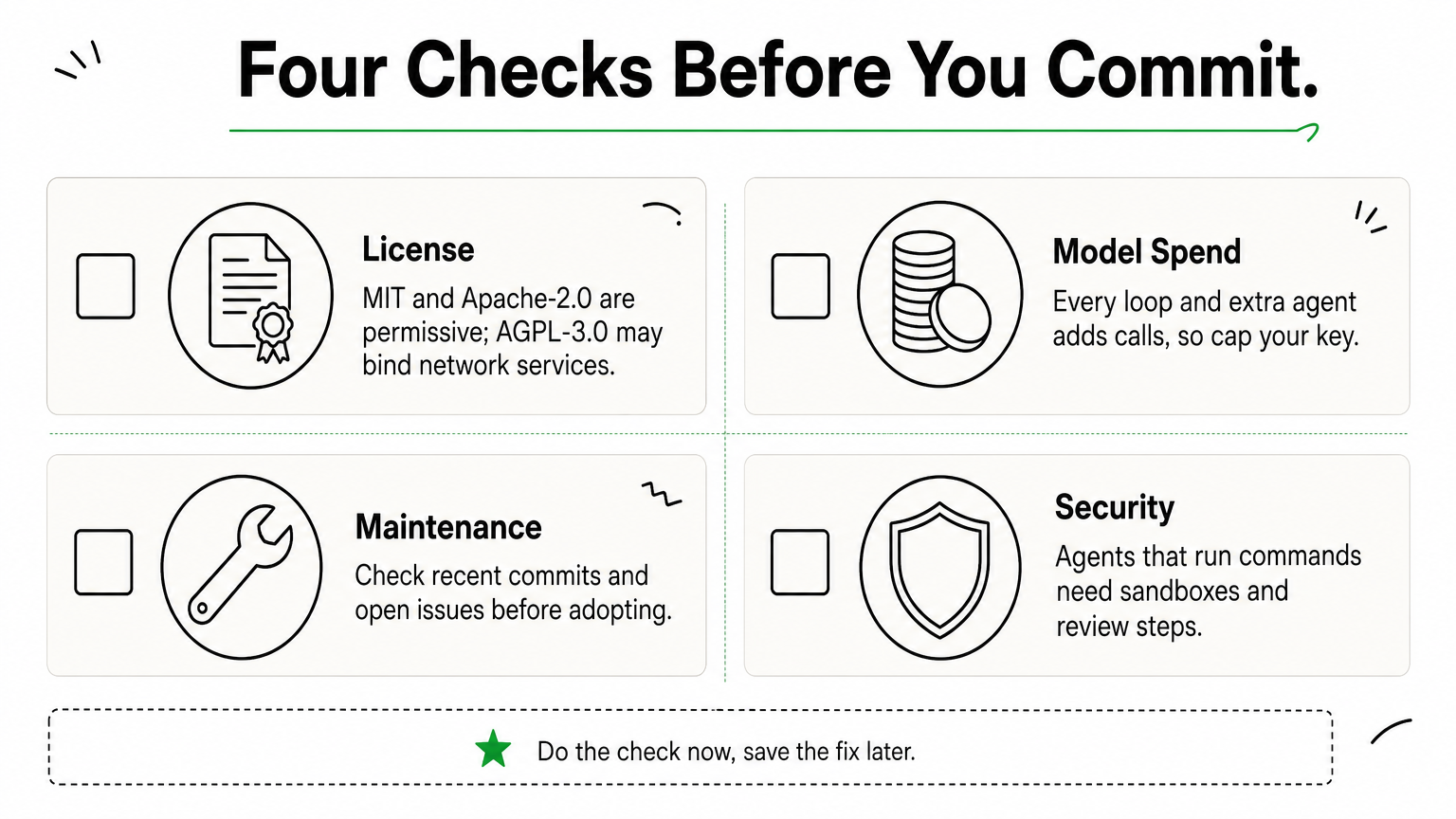
"Free" covers the download, not the running cost. Before you commit, confirm four things:

- License: MIT and Apache-2.0 are permissive. AGPL-3.0 can create obligations if you offer the software as a network service.
- Model spend: every loop and every extra agent adds calls, so set limits on your API key.
- Maintenance: look at recent commits and open issues. Projects change owners and direction quickly.
- Security: agents that run commands or touch files need sandboxes and review steps.
When free tools stop being enough
Open-source agents work well for developers and prototypes. Business use raises different questions: connecting agents to your CRM, ERP, and internal tools, grounding answers in your own company knowledge, and proving to auditors what each AI system does.
That is where custom work starts. Hatzs Dimensions builds AI agents that carry out multi-step tasks across those systems. It also offers AI governance and compliance work mapped to the EU AI Act, NIST AI RMF, and ISO/IEC 42001. Many teams prototype with the tools above and then bring in help for the production version.
Start small, then scale what works
Choose by job. OpenCode and Aider cover everyday coding, OpenHands handles delegated tickets, CrewAI and AutoGen coordinate teams of agents, LangGraph gives you precise control, and Claude Squad runs coding agents in parallel. AutoGPT remains the best classroom.
Run one tool on one real task this week. Cap your model spend, review every change, and note where the tool needed hand-holding. That test tells you more than any comparison, including this one.
If the prototype works and you need it connected to your systems, governed, and supported in production, talk to the Hatzs Dimensions team about a custom AI agent for your workflow.
Want to grow your business?
Categories
Tags
Designed for the Bold
We help ambitious companies turn ideas into production-ready AI, software, and enterprise systems. Get insights on AI, automation, and digital transformation delivered to your inbox.
200+ solutions delivered across 11+ industries — let's build what's next.