











The best AI agents platforms depend on who will build and maintain the agent, not on a single feature list. Non-technical teams get the fastest start from no-code builders such as Gumloop and Lindy. Operations teams that already run automations do well with Zapier Agents, Make or n8n. Engineers lean toward CrewAI or LangChain, and companies tied to one cloud should look at Google’s Vertex AI Agent Builder or Microsoft Copilot Studio. When your systems or compliance rules fit none of these, a custom build is the remaining route.
Every vendor now says "agent", and the pricing units rarely match. One bills in credits, another in activities, another in workflow executions or traces, so a cheap headline price can hide an expensive month. A wrong pick often means rebuilding your first agent on a different tool. This guide covers ten options: what each does, who it suits, what its plans cost and where it falls short. A side-by-side pricing table and a short decision guide follow.
We build custom AI agents at Hatzs Dimensions, so we see where platforms stop working for real company systems. We list our own service first and say plainly that it is a different kind of option from a self-serve tool. Prices come from vendor pages in 2026 and change often, so confirm them before you buy.
What an AI agent development platform does
Agents versus workflow automation
An AI agent platform gives you the parts to build software that takes a goal, chooses its own steps, calls tools and finishes the work with limited supervision. Classic automation follows fixed rules: when a form arrives, add a row and send an email. An agent uses a language model to decide what happens next from context, so it can handle messy inputs such as a vague customer email.

Most real deployments blend both. A fixed workflow covers the predictable steps and an agent covers the judgment calls, such as deciding whether a lead is qualified. That is why automation vendors added agent features and agent-first vendors added workflow canvases, and it is why the groups below overlap.
An agent decides the next step, while a workflow only follows the steps you wrote.
Five kinds of platform
Every tool in this list falls into one of five groups, and the group tells you more than any feature checklist. The group sets how much skill you need, how much you control and who ends up owning the agent.
| Group | In this list | Skill needed | Typical buyer |
|---|---|---|---|
| No-code agent builders | Gumloop, Lindy | None to low | Marketing, sales and ops teams |
| Automation platforms with agents | Zapier Agents, Make, n8n | Low to medium | Ops teams, technical generalists |
| Developer frameworks | CrewAI, LangChain | Python | Engineering teams |
| Cloud suites | Vertex AI Agent Builder, Copilot Studio | Medium | Enterprises on Google or Microsoft |
| Custom development | Hatzs Dimensions | None on your side | Companies with unusual systems or compliance rules |
What to check before you shortlist
Run every candidate through the same seven questions before you compare prices. They separate a demo that looks good from an agent you can keep running in production.
- Time to first working agent: how long from signup to a run that does something correct.
- Integrations: whether the specific apps you use are supported, not how many connectors the vendor advertises.
- Human approval: whether an agent can pause for sign-off before it sends or changes anything.
- Observability: logs or traces that show what the agent did and why.
- Governance and security: SSO, role-based access, audit logs and compliance attestations.
- Pricing unit: credits, activities, executions or seats, and how many of them one real task uses.
- Data control: whether you can self-host or run in your own cloud.
1. Hatzs Dimensions: custom-built AI agents
What it does and who it suits
Hatzs Dimensions is not a self-serve platform. It is an AI agent development company that builds custom agents for multi-step tasks, connects them to your CRM, ERP and internal tools, and has them answer from your own company knowledge. Work follows four steps: discovery and planning, design and prototyping, development and testing, then deployment and support.
It suits teams whose systems, data rules or audit demands do not fit a template, such as insurance, healthcare or banking, where an agent must sit inside existing software and pass a review. The AI governance work maps to the EU AI Act, NIST AI RMF and ISO/IEC 42001. The company has completed 200+ projects since 2019, including a 30% cut in insurance operations costs for BrokerOS.
A platform gets you an agent faster, but a custom build gets you an agent that fits your systems.
Pricing
There is no public seat plan or price list. You choose between two engagement models, and both start with the same four-step process.
- Fixed Price Model: scope, timeline and budget are defined upfront and held.
- Dedicated Teams: a team built to grow with you as the work expands.
Pros and cons
The trade-off is control against speed. You get an agent shaped around your stack, and you give up the signup-and-start convenience of a SaaS tool.
Pros:
- No platform ceiling on integrations, data handling or governance.
- Budget certainty under the fixed-price model.
- Governance and compliance work can sit inside the same project.
Cons:
- Not self-serve, so the first agent takes longer than a trial signup.
- You pay for engineering time rather than a monthly seat.
2. Gumloop: no-code agent builder for teams
What it does and who it suits
Gumloop is a no-code builder where you describe the agent in plain language and its built-in assistant, Gummie, helps you assemble it. You give the agent access to your tools, pick a model and write instructions. It supports MCP servers, and built-in model access means no separate API keys unless you prefer your own. You can also tag an agent in Slack to run it.
It suits marketing, growth and ops teams that want to see the logic on a visual canvas and hand it to a colleague. Check your niche apps first, because the connector library is smaller, roughly 300 connectors against several thousand at Zapier.
Gumloop is the quickest route from a plain-English idea to a shared team agent.
Pricing
Start with the 14-day free trial and confirm any free-plan limits on Gumloop’s pricing page. Billing runs on credits, so measure how many one real task uses.
- Pro: from $37/month with 20,000+ credits, unlimited triggers, webhooks, MCP servers and bring-your-own API key.
- Enterprise: custom pricing with role-based access, SCIM/SAML, audit logs and data retention rules.
Pros and cons
Gumloop is easy to start and easy to share, but it is a younger product with a thinner template ecosystem.
Pros:
- Natural-language agent building.
- Models included, plus MCP and Slack support.
- Teammates can open and edit the same build.
Cons:
- Smaller connector library than the big automation tools.
- Credit-based billing needs monitoring.
- Less mature than long-established platforms.
3. Lindy: AI teammate that works inside Slack
What it does and who it suits
Lindy is an AI teammate you @mention in Slack or message directly, then instruct in plain English. It connects to 1,000+ apps plus any MCP server, runs recurring jobs through "routines", and lets admins name an approver who must sign off before it changes anything. It lists SOC 2 Type II, GDPR, HIPAA and PIPEDA compliance.
It suits founders and ops leads at small and mid-sized companies who want to hand work off without learning a canvas. A research-heavy routine can burn credits fast, so budget with a real task in mind. Approval steps and cited sources make its output easier to check.
Lindy gets you a working agent fastest if the work, not the building, is your bottleneck.
Pricing
The Free plan gives $50 in credits that last 7 days, with no card required. After that, pricing is per user and credit-based.
- Team: from $29.99 per user per month with 3,000 credits per user, pooled across the team.
- Enterprise: custom pricing with HIPAA and a signed BAA, SSO/SCIM and audit logs.
Pros and cons
Lindy trades build control for speed and simplicity.
Pros:
- Almost no setup, since you work in Slack.
- Approvals and source citations are built in.
- Compliance attestations are listed for regulated teams.
Cons:
- Credits drain quickly on research-heavy routines.
- Vague instructions produce vague work.
- Less visible logic than a visual canvas.
4. Zapier Agents: agents on top of existing Zaps
What it does and who it suits
Zapier Agents lets you describe an AI teammate in plain language and give it access to your connected apps, live data sources and existing Zaps. A Chrome extension lets you talk to agents from any tab. Zapier connects to more than 9,000 apps, so the long tail of niche tools is usually covered.
It suits teams that already run Zapier and want AI judgment in the middle of automations that work. From zero, you are buying a large catalog to use a few apps. The agent features sit on a rule-based engine and are sold as an add-on to the core plans.
Zapier Agents pays off in proportion to how much Zapier you already run.
Pricing
Agents have their own plans, separate from core automation plans. The billing unit is an "activity", and one task can use several.
- Agents Free: 400 activities per month.
- Agents Pro: $50/month with 1,500 activities.
- Enterprise: contact sales.
Core automation plans start free, with Professional at $29.99/month.
Pros and cons
The catalog is the draw, and billing is the risk.
Pros:
- The widest app coverage on this list.
- Existing Zaps become reusable steps.
- A free tier to test before paying.
Cons:
- Activity billing is hard to forecast.
- Multi-step reasoning is limited by the rule-based engine underneath.
- The agent builder is an add-on, not the core product.
5. Make: low-cost visual automation with AI agents
What it does and who it suits
Make is a visual automation platform with 3,000+ app connections where AI Agents run inside the same canvas and show each decision step by step. You can add routers, filters and iterators, and give any module its own error route, so one failed step does not kill the whole run.
It suits teams running thousands of runs a month where cost per run decides the purchase, and where only a few steps need to think. The canvas becomes hard to read as scenarios grow. Teams that need agents to reason through most of the process may prefer an agent-first tool.
Make wins on arithmetic once volume gets serious, as long as most steps are rule-based.
Pricing
Make bills in credits and has a free tier that covers a small workflow.
- Free: 1,000 credits per month.
- Core: $12/month billed monthly ($9 billed annually) for 10,000 credits.
- Pro: $21/month billed monthly ($16 annually) at the same credit tier, adding priority execution and custom variables.
- Enterprise: custom pricing.
Pros and cons
Control and price are strong, while support and canvas readability are the weak spots.
Pros:
- Low cost per credit.
- Per-module error handling and retries.
- Transparent, step-by-step agent decisions.
Cons:
- Large scenarios get crowded on screen.
- Support is self-serve first, with some reviewers reporting slow replies.
- Agents are one feature of a broader automation tool.
6. n8n: self-hostable workflows with an AI agent node
What it does and who it suits
n8n is a workflow platform with a visual builder, 500+ integrations and code nodes, available hosted or self-hosted on your own infrastructure. Its AI Agent node supports memory, tool calling and manual approval steps. When no stock node fits, you can drop in a few lines of JavaScript.
It suits technical teams, especially those with an engineer to own it and a reason to keep data on their own servers. Without that person, a non-technical colleague will struggle with the learning curve. Support wait times draw recurring complaints, and a self-hosted outage is yours to fix.
n8n gives technical teams the most control per dollar, and non-technical teams the most friction.
Pricing
Plans are priced by workflow executions, with unlimited users. AI model usage is extra unless you bring your own API keys.
- Starter: $24/month, 2,500 executions.
- Pro: $60/month, 10,000 executions.
- Business: $800/month, 40,000 executions, self-hosted.
- Enterprise: contact for pricing.
Pros and cons
n8n rewards technical skill and punishes the lack of it.
Pros:
- Self-hosting keeps customer data on your servers.
- Code nodes mean you rarely get stuck.
- A large template library and unlimited users.
Cons:
- Steep learning curve and a busy interface.
- Model costs add up on top of the plan.
- Support is a common complaint.
7. CrewAI: role-based multi-agent teams in Python
What it does and who it suits

CrewAI is an open-source Python framework where each agent gets a role, a goal and tools, plus a hosted platform with a visual editor and AI copilot. "Crews" let agents collaborate and decide their own order, while "Flows" pin down a fixed sequence. A common pattern is a researcher, a writer and a reviewer that checks the output.
It suits engineering teams that have outgrown one agent doing everything and want several agents to check each other. One agent doing one task rarely justifies the Python. Expect to write and test code, and expect the free tier to run out during debugging.
CrewAI starts paying back when three agents check each other’s work.
Pricing
The framework is open source. The hosted platform lists a free plan with a visual editor, an AI copilot, GitHub integration and 50 workflow executions per month. Enterprise pricing is custom and adds self-hosting, SSO, role-based access and PII redaction.
- Free: 50 workflow executions per month.
- Enterprise: custom, with self-hosting and compliance features.
Pros and cons
CrewAI is structured and flexible, but it needs engineers.
Pros:
- Role separation catches errors a single agent would pass along.
- Open-source core with no lock-in on the framework.
- Free hosted plan with no sales call.
Cons:
- Requires Python skills.
- The free execution cap is thin.
- A smaller public review base than older tools.
8. LangChain: full control for engineering teams
What it does and who it suits
LangChain is an open-source framework for building LLM applications in Python and JavaScript. LangGraph gives low-level control over each step, and LangSmith handles tracing and evaluation, showing prompts, token counts, latency and cost per run. It is model-agnostic, so switching providers is a configuration change.
It suits engineering teams building an application with an agent inside it, where every no-code tool would get in the way. For a simple task it is overkill, and its abstractions change often enough that older tutorials go stale. Governance and observability are largely yours to assemble.
LangChain hands you every decision, which is a gift to engineers and a burden to everyone else.
Pricing
The framework is free and open source. Costs come from the hosted LangSmith platform.
- Plus: $39 per seat per month with 10,000 base traces and unlimited seats.
- Enterprise: custom pricing with self-hosted and hybrid options.
Pros and cons
You gain tracing and flexibility and pay in engineering time.
Pros:
- Strong tracing and evaluation through LangSmith.
- Free, open-source core and any model provider.
- Structured outputs keep downstream steps predictable.
Cons:
- Steep learning curve, even for technical users.
- Frequent API changes.
- Not usable by non-technical teammates.
9. Vertex AI Agent Builder: Google Cloud’s managed option
What it does and who it suits
Vertex AI Agent Builder is Google Cloud’s managed environment for building agents, with retrieval-augmented generation (RAG), a memory bank and session support, a managed runtime with enterprise SLAs and prebuilt agent templates. It integrates deeply with the rest of the Google stack.
It suits enterprises already committed to Google Cloud that need compliance and managed infrastructure behind their agents. If most of your systems live elsewhere, the integration advantage shrinks and the fit gets awkward. Plan for a cloud engineer, not a business user, to own the setup.
Vertex AI Agent Builder makes the most sense when your data and security already live in Google Cloud.
Pricing
Pricing is usage-based, charged across compute, storage and API calls. That makes it flexible but harder to forecast at scale, so model your expected volume in Google Cloud’s pricing tools before committing.
- Usage-based billing: pay for what the agents consume.
- No flat seat plan: costs track traffic, memory and storage.
Pros and cons
The managed runtime removes infrastructure work, while cost predictability is the main concern.
Pros:
- Managed runtime with enterprise SLAs.
- Memory, sessions and RAG built in.
- Tight integration with Google services.
Cons:
- Less flexible outside Google environments.
- Usage-based pricing grows complex at scale.
10. Microsoft Copilot Studio: agents inside Microsoft 365
What it does and who it suits
Microsoft Copilot Studio is Microsoft’s enterprise agent builder, with native integration into Teams, Office and Entra ID. Identity, role-based access and governance controls come from the Microsoft stack you already administer, which shortens security reviews.
It suits organizations standardized on Microsoft 365, where agents should work inside Teams and respect existing permissions. Outside that ecosystem it offers less. Licensing is also complex, so have your Microsoft admin confirm what you need before you promise a budget.
Copilot Studio is the safest default when your company already runs on Microsoft 365.
Pricing
Copilot Studio is sold through Microsoft enterprise licensing rather than a simple self-serve plan. Costs depend on your existing agreements, so confirm current terms and trial limits on Microsoft’s page.
- Enterprise licensing: priced through Microsoft agreements.
- Trial access: check whether a trial license lets you publish, not only build.
Pros and cons
Governance is strong inside Microsoft and thin outside it.
Pros:
- Native Microsoft 365 and Teams integration.
- Identity and role-based access built in.
- Familiar admin controls.
Cons:
- Licensing is complicated.
- Limited value outside the Microsoft ecosystem.
Pricing and free tiers side by side
Entry prices and free options
The table lines up what each vendor lists, and the last column shows why headline prices mislead. A credit, an activity and an execution are not the same thing, so you cannot compare the dollar figures directly.
| Platform | Free option | Paid entry point | Billing unit |
|---|---|---|---|
| Hatzs Dimensions | None, not self-serve | Fixed price or dedicated team | Project or team |
| Gumloop | 14-day trial | Pro from $37/month | Credits (20,000+ on Pro) |
| Lindy | $50 credits for 7 days | Team from $29.99/user/month | Credits (3,000 per user) |
| Zapier Agents | 400 activities/month | Pro $50/month | Activities (1,500 on Pro) |
| Make | 1,000 credits/month | Core $12/month | Credits (10,000 on Core) |
| n8n | Self-hosted option | Starter $24/month | Executions (2,500 on Starter) |
| CrewAI | 50 executions/month | Enterprise, custom | Workflow executions |
| LangChain | Open-source framework | LangSmith Plus $39/seat/month | Traces and seats |
| Vertex AI Agent Builder | Check Google Cloud | Usage-based | Compute, storage, API calls |
| Copilot Studio | Check Microsoft | Enterprise licensing | License terms |
The cheapest sticker price is rarely the cheapest month once you count real tasks.
A worked example for one lead-research agent
Say your agent researches 1,000 inbound leads a month, and each lead uses three activities (this count is an assumption, so measure yours in a trial). That is 3,000 activities, double the 1,500 included in Zapier Agents Pro at $50/month. You would need a larger tier or fewer steps per task.
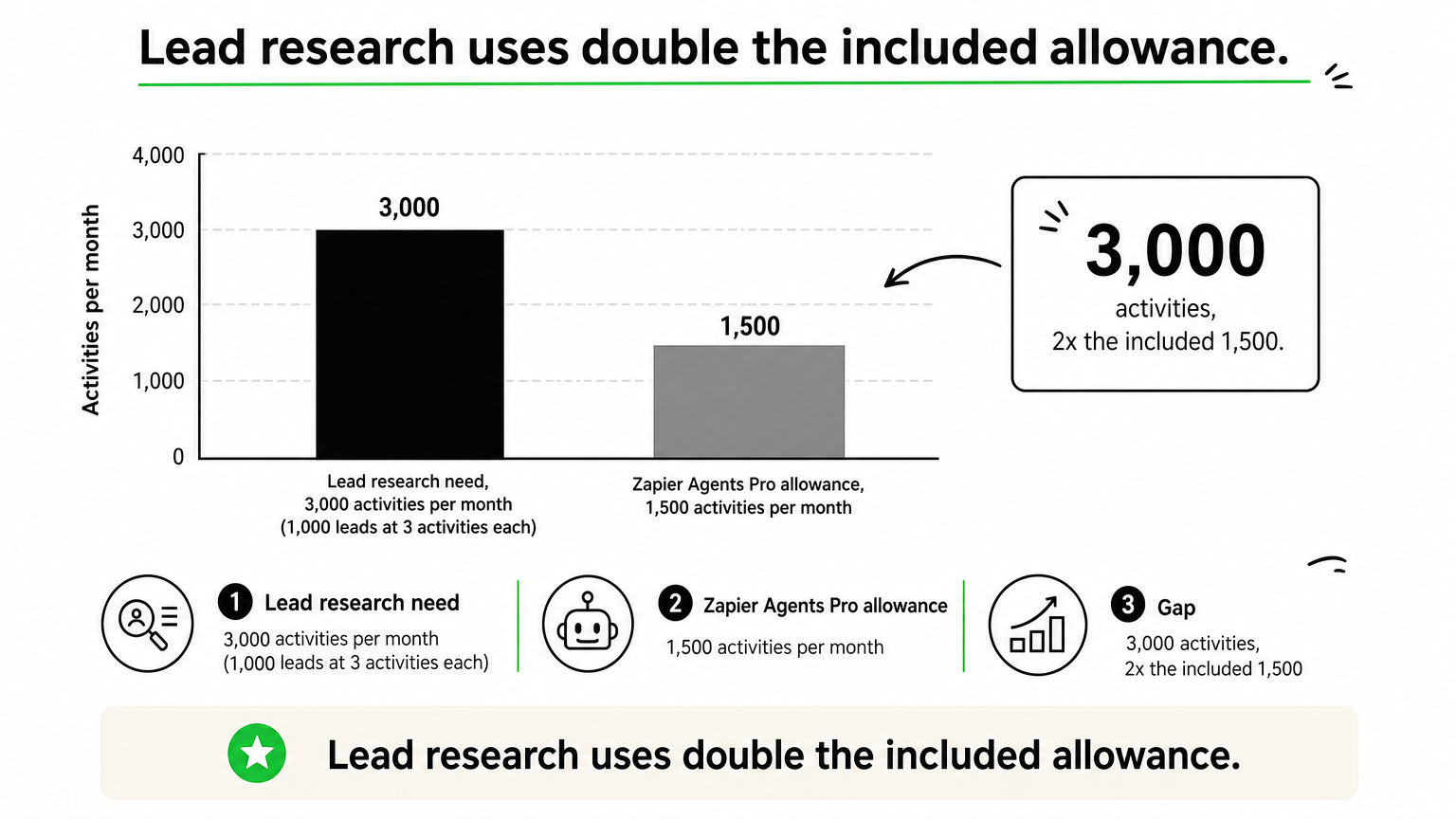
Run the same exercise on every shortlisted tool. Convert one real task into the vendor’s unit, multiply by monthly volume, and compare the total with the included allowance. Add model costs where they are billed separately, as with n8n and LangChain’s hosted tracing.
How to choose the right platform
Match the platform to who will own it
No platform is best for everyone, so pick by the person who will maintain the agent after launch. Use this as a first filter.
- Non-technical team that wants results this week: Lindy or Gumloop.
- Team already running Zapier: Zapier Agents.
- High volume at low cost: Make.
- Engineer who wants to self-host: n8n.
- Python team building multi-agent systems: CrewAI.
- Team building an application with agents inside: LangChain.
- Google Cloud shop: Vertex AI Agent Builder.
- Microsoft 365 shop: Copilot Studio.
- Unusual systems, strict compliance or no one to maintain a tool: a custom build.
Choose the platform for the person who will own the agent in month six, not the one who builds the demo.
Questions that rule options out
Four questions remove most candidates quickly. Answer them before you open any pricing page.
- Do your core systems appear in the platform’s connector list, or would you build the connection yourself?
- Does a regulator or customer require audit logs, role-based access or specific compliance attestations?
- Must data stay on your own servers or cloud?
- Who fixes the agent when it breaks, and are they comfortable with the tool?
Two or more "no" answers on the first three usually point to a self-hosted tool, a cloud suite or a custom build. A "nobody" on the fourth means you should pick the simplest option, even if it costs more.
Picking your first agent platform
Start from your team’s skills and your systems, then check how each vendor bills. No-code tools win on speed, automation platforms win on connectors and cost, frameworks win on control, and cloud suites win on governance inside one ecosystem. Test one real task on a trial, convert it into the vendor’s billing unit and compare totals before you commit.
If your CRM, ERP or compliance rules do not fit any template, a custom build can be the cleaner route than bending a platform. Talk to Hatzs Dimensions about building a custom-built AI agent and we will walk through your systems and the right engagement model with you.
هل تريدون تنمية أعمالكم؟
التصنيفات
صُمّم للجريئين
نساعد الشركات الطموحة على تحويل أفكارها إلى أنظمة ذكاء اصطناعي وبرمجيات ومؤسسات جاهزة للإنتاج. احصل على رؤى حول الذكاء الاصطناعي والأتمتة والتحول الرقمي تصلك مباشرة إلى بريدك الإلكتروني.
200+ حلاً تم تسليمها في 11+ قطاعاً، فلنبنِ معاً ما هو قادم.