








The best AI design agents take a text brief, hold your brand rules in context, and return editable images or video without you steering each step. Lovart suits small teams that want one chat workspace for concepts, images, and video. Canva AI suits marketers who need on-brand social and ad assets fast. Adobe Firefly suits teams that live in Adobe apps. Runway suits anyone whose main deliverable is video. A custom-built agent suits enterprises whose brand rules and approvals sit in internal systems.
The problem is that the label covers too much. Search results mix true agents, single-prompt image generators, and human design agencies that use AI. If you test the wrong category, you lose a week before you notice.
This guide defines the term, then walks through five options. Each one gets the same three checks: how it works, who it suits, and what it costs and limits. Hatzs Dimensions builds custom AI agents and offers UI/UX and design systems services, so we list our own route first and say where it is overkill.
What AI design agents are and how to choose one
What separates a design agent from an image generator
An AI design agent is software that works through several steps on its own from one brief and returns an editable design that you refine by chatting with it. An image generator returns one picture per prompt and forgets the rest. Three tests tell them apart:
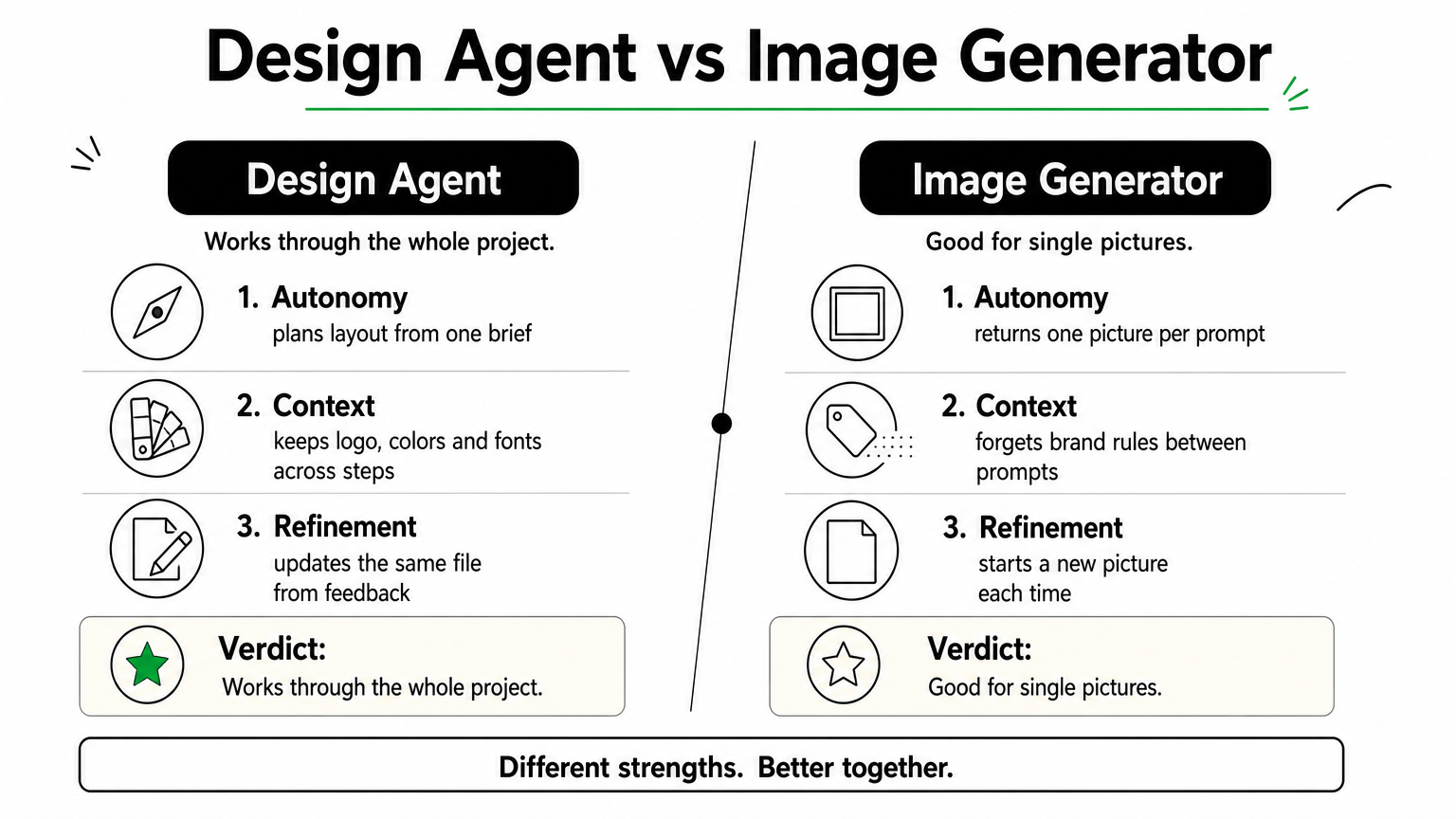
- Autonomy: it plans layout, copy placement, and formats from a single brief.
- Context: it holds your logo, colors, and fonts across the whole project.
- Refinement: it takes feedback such as "lighter typography" and updates the same file.
Two labels cause confusion. "AI design agencies" are human studios that use AI, not software. Lists of "7 types of AI agents" classify how an agent decides, such as reflex, goal-based, or learning, and they do not help you buy a design tool. For design, split by output instead. In practice, AI agents for designers take over production work like resizing and variants, while taste and final approval stay with you.
An agent is worth paying for only when it keeps your brand context across steps.
How to pick by the job you need done
Start with the deliverable, not the brand name. The table sets the five options side by side. The four self-serve tools offer free access, but allowances change often, so confirm current limits on each pricing page.
| Option | Best for | Main output | Cost model |
|---|---|---|---|
| Hatzs Dimensions custom agent | Enterprise brand workflows | Built to your scope | Fixed-price project or dedicated team |
| Lovart | Concept to asset in one chat | Images and video | Free allowance, paid plans |
| Canva AI | Marketing assets with a Brand Kit | Social, ads, presentations | Free plan, paid plans |
| Adobe Firefly | Licensed-content generation inside Adobe apps | Images and video | Free allowance, paid plans with credits |
| Runway | Video production | Video clips and edits | Free allowance, paid credit plans |
Take a launch that needs 8 headlines in 5 ad sizes, plus 3 short videos. That is 8 × 5 = 40 static assets, or 43 deliverables with the videos. A layout tool such as Canva AI or Lovart covers the 40 statics, and Runway covers the 3 videos. You use two tools and reuse one brand brief in both.
1. Hatzs Dimensions custom design agents
How it works
HATZS builds custom agents that carry out multi-step tasks, connect to your CRM, ERP, and internal tools, and answer from your own company knowledge. For a design team, that means scoping an agent around your brand rules and approval flow instead of renting a general tool. What the agent calls, such as image models or your asset library, is settled in discovery.
- Discovery and planning: map brief types, brand sources, and approvers.
- Design and prototyping: test the agent’s flow before anything is built.
- Development, testing, and support: build, verify, deploy, and maintain.
Who it suits
Choose this route when brand assets pass through several systems and people, as in banking, insurance, or healthcare. Off-the-shelf tools usually do not connect to your internal approvals or product data. A custom agent can. HATZS has completed 200+ long-term projects since 2019.
Build a custom agent when your brand rules live in systems that no public tool can reach.
Pair it with the HATZS design systems service, which builds reusable components, standards, and documentation. That gives the agent one consistent source of brand truth to work from.
Pricing and limits
There is no subscription. HATZS offers a Fixed Price Model that sets scope, timeline, and budget upfront, and Dedicated Teams that grow with your needs.
The limit is speed and size. This is a project, not a login. If you publish a few social posts a week, a Canva or Lovart plan is cheaper and faster.
2. Lovart
How it works
Lovart presents itself as a design agent that brings leading image and video models into one workspace. You brief it in chat, it brainstorms directions, produces assets, and lets you edit without leaving the project. It is software, not a human agency.
- Brainstorm: turns a loose idea into visual directions.
- Design: generates images and video from your brief.
- Edit: refines the result in the same place.
Who it suits
Founders, freelancers, and small marketing teams get the most from it. They want concept-to-asset work from one brief and have no in-house designer. It is also a sensible first test if you want to feel how an agent works before you commit to a suite.
Lovart is the quickest way to see what a chat-driven design agent feels like.
Skip it if you need strict multi-seat brand governance. Check team sharing, export formats, and commercial-use terms before you rely on it, since newer products change quickly.
Pricing and limits
Expect a free allowance and paid tiers that meter usage in credits. Confirm today’s limits on its pricing page, because allowances shift often.
Breadth is also its limit. A tool that covers images and video together gives you less control over a single clip than a specialist such as Runway.
3. Canva AI
How it works
Canva AI works inside the Canva editor, so generated images, copy, and layouts land in a design you can edit at once. The Brand Kit stores your logos, colors, and fonts so new designs start on brand.
- Generate: images, text, and layouts from a prompt.
- Brand: apply your Brand Kit across designs.
- Reuse: templates and resizing carry one design into many formats.
Who it suits
Marketers, small businesses, and non-designers benefit most. The editor is familiar, so training time is close to zero, and teammates can share and edit the same file.
For everyday marketing assets, Canva AI is the lowest-friction way to stay on brand.
Agencies that need pixel-precise vector work will hit limits. Canva is built for speed on common formats, not for custom illustration.
Pricing and limits
Canva has a free plan and paid plans, and brand controls are strongest on paid tiers. Check which AI features each plan includes before you budget.
It produces marketing assets, not product interfaces, and it leans on you for direction more than a true agent does. For cinematic video, a dedicated video model gives more control.
4. Adobe Firefly
How it works
Adobe Firefly generates images and video from text and connects to Photoshop, Illustrator, and Adobe Express. You generate, then finish in the tools designers already use. Adobe states that its own Firefly models are trained on licensed content such as Adobe Stock and public-domain material.
- Generate: images and video from a text prompt.
- Finish: carry results into Photoshop, Illustrator, or Express.
- License: Adobe positions its models for commercial use.
Who it suits
Teams already on Creative Cloud, agencies, and brands that worry about copyright exposure get the most value. Designers keep layers and editable files instead of flat exports.
Firefly wins when licensing comfort and Adobe workflows matter more than full autonomy.
Be clear on the trade. Firefly is closer to a generation suite than an autonomous agent, so you still direct most steps yourself.
Pricing and limits
Firefly has a limited free allowance, and paid plans include monthly generative credits. Some Creative Cloud plans bundle credits, so check what you already own before you buy more.
Non-designers face a steeper learning curve than in Canva. Heavy video use can also burn credits quickly.
5. Runway
How it works

Runway creates and edits video from text, images, and existing footage. Its recent models focus on consistent characters, objects, and style across shots, which matters when a brand needs the same look in every clip.
- Text to video: turn a written brief into a clip.
- Image to video: animate approved brand images.
- Video editing: change existing footage with a prompt.
Who it suits
Video marketers, social teams, and creative studios are the core users. Use it for ad concepts, product teasers, and short social clips where motion is the deliverable.
If video is the product, pick Runway first and add a layout tool second.
Pair it with Canva AI or Lovart for static assets, as in the 43-deliverable launch above.
Pricing and limits
Runway offers a free allowance and paid credit-based plans. Credits drain faster with longer clips and repeated retries, so plan for several attempts per clip.
It is video-first. It will not build logos, ad banners, or brand layouts, so it cannot be your only tool.
Pick by output, then test one
Choose AI design agents by what you need back. Lovart gives you one chat for concepts, images, and video. Canva AI keeps everyday marketing assets on brand. Firefly fits Adobe workflows and licensing concerns. Runway handles video. A custom agent connects brand rules to the systems where your approvals already happen.
Run one real brief through two candidates before you pay for either. Check whether the output is editable, whether the brand stays consistent across variants, and how many retries it takes to get a usable result.
If your brand rules and approvals live in internal systems, talk to Hatzs Dimensions about a custom AI design agent.
Want to grow your business?
Categories
Designed for the Bold
We help ambitious companies turn ideas into production-ready AI, software, and enterprise systems. Get insights on AI, automation, and digital transformation delivered to your inbox.
200+ solutions delivered across 11+ industries — let's build what's next.