











AI customer service agents are software systems, built on large language models, that read a customer’s request, find the answer in your company’s knowledge, take actions in your systems, and pass the conversation to a person when they should. Unlike a scripted chatbot, an agent can finish the job. It can check an order, issue a refund within a limit you set, or reset an account without a human touching the ticket. Yes, they exist, they run in production at many companies, and they are now the most direct way to cut repetitive support workload.
This guide covers why they matter, how they work under the hood, and how they differ from chatbots and copilots. It also shows what they handle well and badly, how to roll one out in stages, what the tools cost, and when a custom build beats an off-the-shelf product. You will finish with enough to shortlist tools or write a clear brief for a build team.
We write this from the build side. Hatzs Dimensions is an AI agent and custom software development company, so we see what separates agents that resolve tickets from agents that annoy customers. Most of the difference comes from knowledge quality, system access, and guardrails, not from the model itself.
Why AI customer service agents matter to your support team
AI customer service agents matter because they take over the repetitive tickets that consume most of a support team’s capacity, answer customers instantly at any hour, and free your people for cases that need judgment. The gain is not only lower cost. It is a support operation that scales with demand instead of with headcount.
They absorb repetitive volume
Most support queues are dominated by a short list of questions. The answers already sit in your help center, your policies, or your order system. An agent that can read that content and call those systems resolves these requests without a person. Typical candidates include:
- Order status and delivery tracking
- Password resets and account access
- Return and refund requests that fall within policy
- Plan, pricing, and billing questions
- Appointment changes and bookings
- How-to questions already covered in your docs
The goal is resolution, not deflection. A deflected ticket is one where the customer gave up. A resolved ticket is one where the problem is solved. Agents that can take actions, such as processing a refund, resolve far more tickets than agents that only quote an article back to the customer.
An AI customer service agent earns its place by resolving tickets, not by deflecting them.
They give customers speed at any hour
Customers do not wait for business hours. An agent gives you 24/7 coverage across time zones, with a first response in seconds instead of hours. It also absorbs spikes from a product launch, an outage, or a holiday rush without overtime or emergency hiring.
Consistency is the quieter benefit. The agent applies the same policy on the thousandth conversation as on the first, and it does not have bad days. Several platforms advertise support for 50 or more languages, which lets a small team cover markets it could not staff with human agents alone.
They make your support data usable
An agent sees every conversation, which means it can show you what customers actually ask about. Say 8% of conversations in one week mention a coupon that fails at checkout. That is a product bug, and the support data told you before your analytics did.
Agents also reveal knowledge gaps. Every time the agent cannot answer, you learn which article is missing or wrong. Teams that review these gaps weekly improve their resolution rate faster than teams that only tune prompts.
Where the market is heading
Gartner has predicted that agentic AI will autonomously resolve 80% of common customer service issues without human intervention by 2029. Treat that as a forecast, not a promise, and note the word "common". It does not cover the hard cases.
The practical point is customer expectations. Once your customers get an instant, correct answer from one company, they expect it from the next. Waiting two years to start means learning on a deadline.
How AI customer service agents work
An AI customer service agent runs a loop on every message: understand the request, retrieve the right knowledge, decide what to do, act in your systems, and then answer or escalate. The language model is one part of that loop. Knowledge, system connections, and rules decide whether the result is good.
The five steps of a single conversation
Every conversation follows the same pattern, even when the customer never sees it:
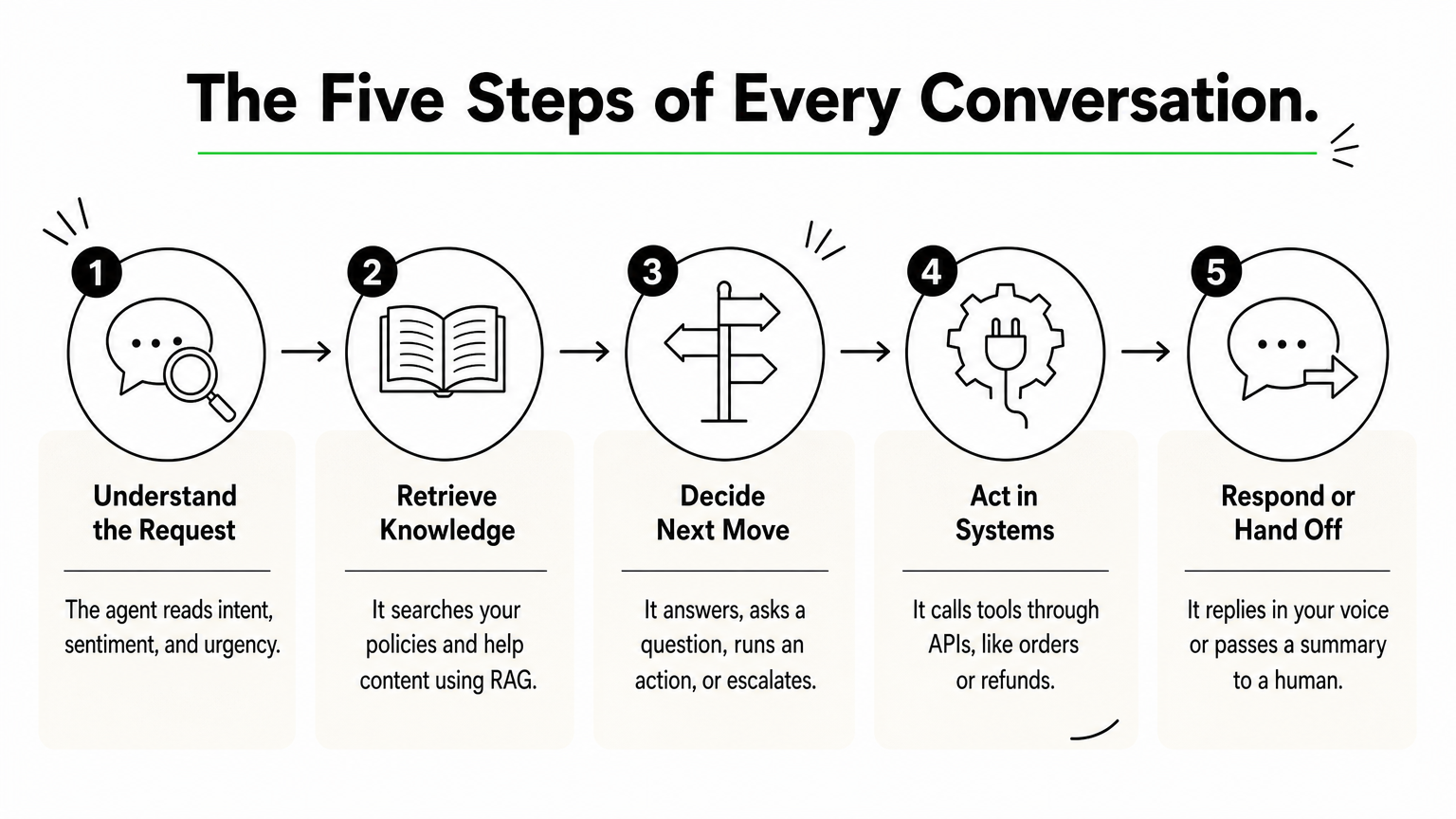
- Understand. The agent classifies the intent ("where is my order") and reads sentiment and urgency.
- Retrieve. It searches your knowledge base, policies, and past resolved tickets for relevant passages. This is retrieval-augmented generation, or RAG, and it keeps answers grounded in your content instead of the model’s general memory.
- Decide. It chooses the next move: answer, ask a clarifying question, run an action, or escalate.
- Act. It calls tools through APIs, such as looking up an order in your commerce platform, updating an address in your CRM, or creating a refund.
- Respond or hand off. It writes the reply in your brand voice, or passes the conversation to a human with a summary.
Here is how that looks in practice. A customer writes, "My package says delivered but I never got it." The agent identifies a missing delivery and pulls the order and carrier status. It checks your lost-package policy and sees the order is under your automatic reshipment limit. It creates the reshipment and tells the customer what happens next. If the order were over the limit, the agent would escalate with a summary instead of deciding alone.
The components that decide quality
Six components make up a working agent. A weakness in any one shows up as a specific kind of failure.
| Component | Its job | What goes wrong when it is weak |
|---|---|---|
| Language model | Understands requests and writes replies | Awkward, slow, or wrong wording |
| Knowledge base and RAG | Grounds answers in your content | Outdated or invented answers |
| Tool connections (APIs) | Lets the agent take actions | It can talk but never resolve |
| Policies and guardrails | Limits what the agent may do | Refunds beyond policy, off-brand replies |
| Memory and customer context | Carries history across channels | Customers repeat themselves |
| Handoff and logging | Escalates and keeps an audit trail | Frustrated customers, no way to debug |
Teams often spend weeks comparing models and days on the rows below it. Reverse that effort. Current models are good enough for support. Your knowledge base and your API access are what differ between companies.
Handoff decides whether customers trust it
A good handoff is a hot handoff. The human sees the full conversation, a short summary, what the agent already tried, and which customer details were verified. The customer never has to start over.
A bad handoff is the fastest way to lose trust, because it proves the automation was a wall instead of a helper. Design the escalation path before you design the happy path, and make it easy for customers to reach a person. Section five gives you a template for the rules.
The model writes the reply, but your knowledge and system access decide whether the ticket gets resolved.
AI agents vs chatbots, copilots and automation rules
Chatbots follow scripts, copilots help human agents write, and AI agents for customer service act on their own within limits you set. Many products blend these, so judge a tool by what it can do, not by what the vendor calls it.
| Type | How it works | Who finishes the ticket | Typical task |
|---|---|---|---|
| Rule-based chatbot | Decision tree or keyword match | Customer self-serves, or a human | FAQ menu, store hours |
| AI chatbot | Language model answers from a knowledge base | Usually the customer; human on escalation | Explaining a policy |
| Agent copilot | Drafts replies and summarizes threads for staff | A human | Speeding up complex tickets |
| AI customer service agent | Reasons, calls tools, resolves | The agent, with handoff | Refund, address change, plan change |
| Multi-agent system | Specialized agents for triage, resolution, and QA coordinate | Agents, supervised by humans | High-volume enterprise operations |
Where scripts break and agents do not
A rule-based bot fails the moment a customer phrases a request in a way nobody anticipated. It matches keywords, so "I was charged twice" and "why is there a duplicate payment" can land in different branches. An agent reads meaning rather than keywords, which is why it copes with messy, multi-part messages like "I need to change my address and also my order arrived damaged".
The tradeoff is predictability. A script does exactly what you wrote. An agent chooses its own path, so you control it with policies, permissions, and testing instead of flowcharts.
Why copilots are a useful first step
A copilot sits inside your agents’ inbox. It drafts replies, summarizes long threads, and surfaces the right article. The risk is low because a human reviews every message before it goes out.
Copilots also teach you something. They show which drafts your team accepts, edits, or rejects, and those edits reveal knowledge gaps before a customer ever sees them. If your team is nervous about autonomy, run a copilot for a month first.
The line that matters is action
The single test for an AI customer service agent is whether it can write to your systems. Reading an article aloud is a chatbot. Looking up an order, verifying the customer, and issuing the refund is an agent.
When you evaluate a tool, ask the vendor to show one real action completed end to end in a sandbox. If the demo ends with "and then it creates a ticket for your team", you are looking at a chatbot with better writing.
If it cannot change something in your systems, it is a chatbot, however it is marketed.
What AI customer service agents can and cannot handle
AI customer service agents handle high-volume, well-documented, rule-based requests very well. They handle emotional, ambiguous, high-stakes, or exception-heavy cases poorly. Your job is to draw that line deliberately instead of discovering it through complaints.
Tasks that fit an agent
Fit depends on two things: how clearly your policy is written, and whether the agent can reach the data it needs.
| Task | Fit for an agent | Condition |
|---|---|---|
| Order status and tracking | High | Order system connected |
| Password and account access | High | Identity verification step in place |
| Returns and refunds under policy | High, with limits | Refund cap and clear rules |
| Billing disputes | Medium | Escalate above set amounts |
| Technical troubleshooting | Medium | Strong docs, access to account data |
| Cancellations and retention | Medium | Offer rules defined, human option offered |
| Upset or distressed customers | Low | Human first |
| Legal, medical, or safety issues | Low | Human, with compliance review |
Notice the pattern in the table. The high-fit rows share a written rule and a system of record. The low-fit rows depend on empathy, discretion, or liability.
Tasks that need a person
Escalate when a customer is angry, grieving, or frightened. Escalate when the case involves legal exposure, safety, or regulated advice. Escalate when the policy has no clear answer and someone has to make an exception.
There is a quieter category too: high-value accounts. A large customer with a billing problem wants to feel known. An instant, correct answer is good, but a named contact may be better for the relationship. Decide this by account tier, not by guesswork.
Will AI replace customer service agents?
AI will shrink the volume of simple tickets that people handle, and it will change what support jobs look like. It will not remove the need for people. Gartner’s own forecast applies to "common" issues, which leaves the complex remainder.
What changes is the work mix. Humans move toward complex cases, retention conversations, and quality review. A new set of tasks appears: maintaining the knowledge base, auditing AI conversations, and tuning policies. Teams that treat the agent as a new colleague to train and supervise get better results than teams that treat it as a switch to flip.
Plan for your support team to do different work, not no work.
How to roll out AI agents for customer service
Roll out an AI customer service agent in stages: audit your tickets, fix your knowledge, set guardrails, then pilot on limited traffic and widen based on measured results. Skipping the first three stages is the most common reason pilots disappoint.
Audit your tickets and pick the first use cases
Export three months of tickets and label the contact reasons. Rank them by volume, then by risk. Your first use cases are the ones that are high in volume and low in risk, usually three to five of them.

For each use case, write down what "resolved" means in one sentence. "Customer receives a tracking link and confirms" is a definition. "Customer was helped" is not. Without definitions you cannot measure anything later, and you cannot compare vendor claims, because vendors define a resolution differently.
Fix your knowledge before you switch anything on
The agent can only be as good as the content behind it. Review the articles for your chosen use cases and check three things: they are current, they state policy in plain words, and they contain no contradictions between articles. Contradictions are common, and a model will pick one at random.
Write the missing pieces too. Support teams carry a lot of knowledge in their heads, such as "we always allow a return if the customer is within 35 days and it is the first claim". If it is not written down, the agent does not know it. Turn those unwritten rules into short, explicit articles.
Set guardrails, permissions, and escalation rules
Decide what the agent may do, up to which limits, and when it must stop. Give it the least access it needs, such as read access to orders and write access only to the refund action with a cap. Here is a template to adapt:
Escalate to a human immediately when:
- The customer asks for a person, in any wording
- Sentiment is angry or distressed in two consecutive messages
- The agent has failed to resolve after two attempts
- A refund or credit would exceed $[limit]
- The topic involves legal, safety, medical, or account-security issues
- The customer is on a [VIP / enterprise] account

On every handoff, include:
- A three-line summary of the issue
- Actions already taken
- Customer and order details already verified
- Suggested next step
If your industry is regulated, add review of data handling at this stage. Know where customer data goes, whether the vendor trains models on it, and who can see transcripts.
Pilot, measure, then widen
Move through four phases. Start in shadow mode, where the agent drafts answers that nobody sends, and compare them with what your team wrote. Then run it as a copilot. Then let it handle 10% to 20% of live traffic for your chosen use cases. Only then expand.
Track a small set of numbers weekly:
- Resolution rate: conversations resolved without a human, using your definition
- Escalation rate and reasons: why the agent handed off
- CSAT on AI conversations versus human ones: the comparison matters more than either number
- Reopen rate: tickets the customer came back about
- Cost per resolution: all-in, including platform fees and QA time
- Accuracy audit: a human reads a sample of 50 to 100 conversations and scores them
The accuracy audit is the one teams skip, and it catches the problems the other numbers hide.
Pilot on narrow, low-risk use cases, and widen only when your own numbers say so.
What AI agents for customer service cost and how to choose
AI agents for customer service are most often priced per resolution, at roughly $0.75 to $1.25 for published rates, with some vendors charging per conversation, per plan, or by custom quote. Your real cost depends on how many tickets the agent resolves and what you pay for the helpdesk around it.
Common pricing models
| Vendor example | Pricing model | Published price |
|---|---|---|
| Help Scout AI Answers | Per resolution, on top of a helpdesk plan | $0.75 per resolution |
| Gorgias AI Agent | Per resolution, add-on to a ticket plan | $0.90 per resolution |
| Intercom Fin | Per resolution, 50-resolution monthly minimum | $0.99 per resolution |
| Crescendo | Per resolution plus fixed monthly fee | $1.25 per resolution |
| Salesforce Agentforce | Per conversation | $2 per conversation |
| Botpress | Monthly plans, usage-based | $150 per month (Plus), $750 per month (Team) |
| Decagon, Ada, Forethought, Kustomer | Custom quote | Not published |
These figures come from vendors’ published pricing and change often, so confirm on each vendor’s pricing page before you budget. Per-resolution pricing aligns the vendor’s incentive with yours. Its weakness is unpredictable bills in a spike month, so ask about caps. Per-conversation pricing charges for conversations the agent fails to resolve, which makes the effective cost per resolution higher than the headline.
A worked example
Take a team that receives 10,000 tickets a month. The agent resolves 40% of them, which is 4,000 resolutions. This table shows the AI platform cost at four per-resolution rates:

| Price per resolution | Cost for 4,000 resolutions |
|---|---|
| $0.75 | $3,000 |
| $0.90 | $3,600 |
| $0.99 | $3,960 |
| $1.25 (plus fixed monthly fee) | $5,000 plus the fee |
Now compare with the human cost. Assume a fully loaded cost of $6 per human-handled ticket. Replace this with your own number. Without an agent, 10,000 tickets cost $60,000. With an agent at $0.99, the 6,000 remaining tickets cost $36,000, plus $3,960 for the agent, which totals $39,960. The monthly saving is $20,040.
Treat that as a ceiling. It leaves out setup, knowledge work, helpdesk seats, and QA time. It also assumes the agent really resolves 40%. Run your pilot to find your actual rate before you commit to a contract. For voice agents, ask each vendor for its per-minute or per-call rate, because voice pricing varies more than chat pricing.
Choosing a tool
People often ask who the "big four" AI agents are. There is no official ranking, but Intercom’s Fin, Zendesk’s AI agents, Salesforce Agentforce, and Ada come up most often on shortlists. Choose by fit rather than fame. Four categories cover most needs:
- Helpdesk-native agents suit you if you already use Zendesk, Intercom, HubSpot, or Salesforce. Setup is faster because the data is already connected.
- Ecommerce specialists such as Gorgias or Yuma AI understand returns, exchanges, and Shopify order data.
- Enterprise multichannel platforms such as Decagon or Ada cover voice, chat, and email at high volume, usually on custom quotes.
- Builders and custom agents give you control over workflows, at the cost of more setup.
Whatever you shortlist, ask each vendor these questions:
- How do you define a resolution, and who verifies it?
- Which actions can the agent take through APIs today, not on the roadmap?
- What does the handoff look like, and what does the human see?
- Is customer data used to train models, and where is it stored?
- Can I test in private before going live?
- What does my bill look like in a month with double the volume?
Compare vendors on cost per resolved ticket, not on the headline price.
When a custom AI customer service agent makes sense
A custom AI customer service agent makes sense when your workflows depend on systems, rules, or compliance needs that a packaged product cannot reach. If your support runs on a standard helpdesk with common ticket types, buy. If it runs through proprietary systems, build or customize.
Signs that off-the-shelf will not fit
Look for these signals. Your resolutions depend on an in-house ERP or order system with no standard connector. Your answers draw on several knowledge sources, such as contracts, policy documents, and internal wikis. Your industry requires audit trails, data residency, or review of every AI decision. Or your actions span several tools, such as a billing change that touches the CRM, the ERP, and a notification system.
In these cases the cost of working around a packaged tool tends to exceed the cost of a purpose-built agent. The workaround shows up as manual steps your team still performs after the AI "resolves" the ticket.
What a custom build involves
A custom agent usually has three layers. The first is the agent logic: multi-step task handling with defined permissions. The second is the connections to your CRM, ERP, and internal tools. The third is grounding in your own company knowledge through RAG, so answers come from your documents and not from general training.
At Hatzs Dimensions we build these agents, along with the LLM applications and RAG pipelines behind them. Our process follows four steps: discovery and planning, design and prototyping, development and testing, and deployment and support. Clients choose a dedicated team or a fixed-price model that sets scope, timeline, and budget upfront. We have completed 200+ long-term projects since 2019.
Governance for regulated teams
If you operate in finance, healthcare, or insurance, add governance to the plan from day one. Frameworks such as the EU AI Act, NIST AI RMF, and ISO/IEC 42001 shape what documentation, monitoring, and oversight your AI systems need. Retrofitting that after launch is slower and more expensive than building it in.
A practical hybrid also works. Start with a packaged agent for your simplest ticket types to learn what your customers ask. Then commission custom work for the complex actions that the platform cannot reach.
Start small, measure, then widen
AI customer service agents are systems that understand requests, use your knowledge, take actions in your tools, and hand off to people at the right moment. They pay off when you aim them at high-volume, low-risk tickets, ground them in clean knowledge, and measure resolution with your own definition.
Begin with a ticket audit, fix the articles behind your top use cases, write the escalation rules, and run a narrow pilot. Compare vendors on cost per resolved ticket. If your systems or compliance needs go beyond what packaged tools reach, talk to Hatzs Dimensions about building a custom AI customer service agent.
Want to grow your business?
Categories
Designed for the Bold
We help ambitious companies turn ideas into production-ready AI, software, and enterprise systems. Get insights on AI, automation, and digital transformation delivered to your inbox.
200+ solutions delivered across 11+ industries — let's build what's next.